This article is about setting up Katello as a package mirror for Icinga. Specifically, Icinga for Windows, Debian / Ubuntu, Red Hat Enterprise Linux and other derivatives.
In consulting, different products from our portfolio come together again and again, and since we naturally also work on open source projects and want to improve them, such a meeting is always the right starting point. This was also the case recently when I spoke to Christian Stein, the main contact person for Icinga for Windows, after a customer meeting. After a brief conversation about my request, he referred me to Alexander Klimov, who is responsible for this part of the Icinga infrastructure.
Thanks to them, there is now a new feature that makes it easier to synchronize Icinga for Windows with your own environment when using Katello (a plugin for Foreman). This feature is called PULP_MANIFEST and enables synchronization as a simple file repository. This applies not only to users of the open source project Katello, but also to users of the downstream products Red Hat Satellite and Orcharhino as well as users who directly use the backend component Pulp.
I would like to take this as an opportunity not only to highlight this new feature, but also to write a short tutorial on how to mirror the various Icinga repositories with Katello and perhaps provide the reader with a few tips along the way. Of course, the whole thing can be applied to any repository and in addition to the types I’m about to show, there are others that Katello supports.
Package mirror for Icinga for Windows
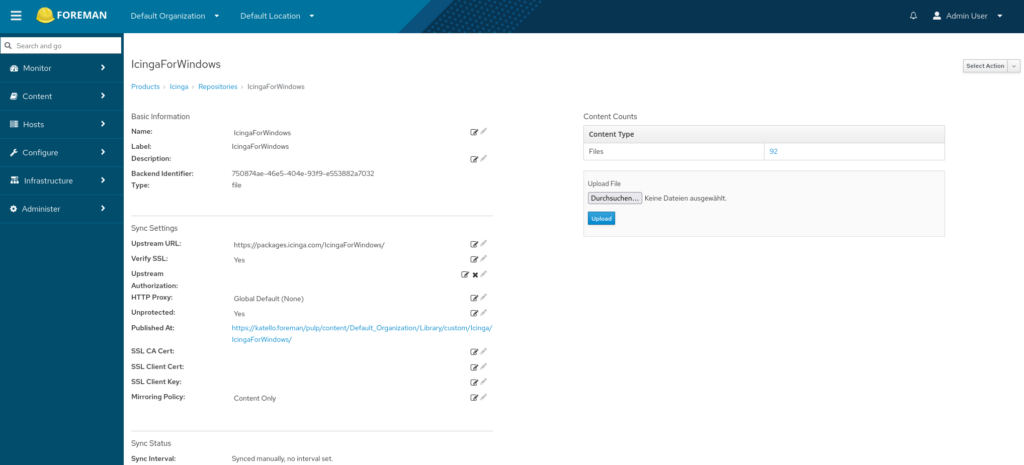
Following the philosophy of creating each project or manufacturer as a separate product, I would always start with a product “Icinga” in Katello, under which the repositories are then created. Here I would like to start with Icinga for Windows. In the wizard you only have to specify the name from which the label is automatically filled, I like to stick with “IcingaForWindows” here, so both remain the same and I can easily switch between user interface and automation. You must then select “file” as the type and “https://packages.icinga.com/IcingaForWindows/” as the upstream URL , as this is where the PULP_MANIFEST file is located.
This file contains a list of all files with checksum and size and serves Pulp as metadata for this repository type. With Icinga, the file is simply generated by a separate script in the existing workflow; it may be even easier with pulp-manifest.
A mirroring policy can also be selected. Additive” may sound interesting here, but due to the structure of the IcingaForWindows repositories with their own metadata, older versions would not remain readily available anyway and the repository already contains one major version more than is still supported. Therefore, only “mirror content” makes sense in this case. Similarly, it only makes sense to check Unprotected, as client certificates cannot be used here.
If required, a proxy can also be configured in advance and then selected for this repository. Once everything has been set correctly, all you have to do is save and then start the sync. The repository should then look like this and be available for the clients under the URL at Published At :
Package-Mirror for Debian / Ubuntu
The workflow for Debian and Ubuntu would be the same, but since Icinga offers two separate repositories here, the example for Debian must also be repeated for Ubuntu. This can also be solved differently for other projects.
Here, too, you simply create a repository under the product; I suggest “Debian” as the name, as you can always see the product. However, for some it is too confusing if several repositories are called “Debian”, then I recommend using the product as a prefix. The upstream URL would then be “https://packages.icinga.com/debian/”.
The releases/distributions are e.g. “icinga-bookworm icinga-bullseye”. I have only recently been able to recommend this, as Katello or Pulp previously only had a flat repository structure and therefore several values would have been mixed here. Structured repositories are now supported, which simplifies configuration. But here too, if you prefer to have one repository per release, simply add the release name as a suffix to the name and only ever use one value here.
The component gives us upstream and is “main” here. The architectures allow a limitation to “amd64”, for example, which covers my needs. You could also build separate repositories here, but I have not yet had any customers request this in practice.
For Icinga, I recommend “On Demand” as the download policy and “Content Only” as the mirroring policy, as Upstream leaves all packages in the repository anyway and you can therefore save space. This is not the case with other projects and you should ensure that all content has been downloaded and, if necessary, is not deleted by selecting “Immediate” and “Additive”.
Of course, a proxy can also be stored here and, depending on how the clients are to be connected, the Unprotected checkbox can be removed. The repository is now configured and can be saved and synchronized.
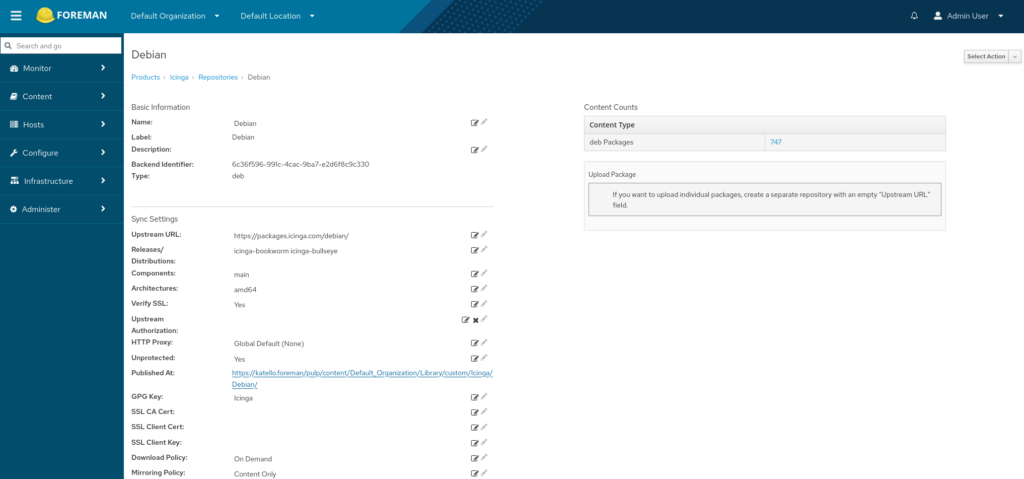
In this screenshot you can see that I have stored a GPG key. This works via the menu item Content Credentials and is recommended here to ensure integrity.
Package mirror for Red Hat Enterprise Linux and derivatives / SUSE
Some say the best comes at the end, here I say the most complicated at the end. Not because it is overly complicated, but in contrast to Debian / Ubuntu we need individual repositories and in the case of Icinga we also need credentials to get access to Upstream at all.
So here we create a repository again, but the name is best composed of several components, namely the name of the operating system, the version and the architecture in my case “EL9-x86_64”. If you prefer this, you can of course add a prefix and in the case of Icinga, the architecture can be omitted. On the one hand, Icinga uses the SUSE standard, in which all architectures are located in one repository, and on the other hand, the project only provides architecture-independent and 64-bit packages.
If the target operating system is Red Hat Enterprise Linux, the client connection with the Subscription Manager can be simplified with the publishing settings, i.e. the assignment of version and architecture. This does not work on other operating systems, which has technical reasons, but will hopefully be solved differently at some point.
The upstream URL “https://packages.icinga.com/subscription/rhel/9/release/” is then required, under which the metadata can be found. As I rarely see the need, I usually choose the Ignore SRPMs option. And since this repository is access-restricted via user and password, I simply store this as Upstream Username and Upstream Password. A token would also be supported here if Upstream uses it.
Now select “On Demand” as the download policy and “Content Only” as the mirroring policy as well as Proxy and Protection if required, save and start the sync.
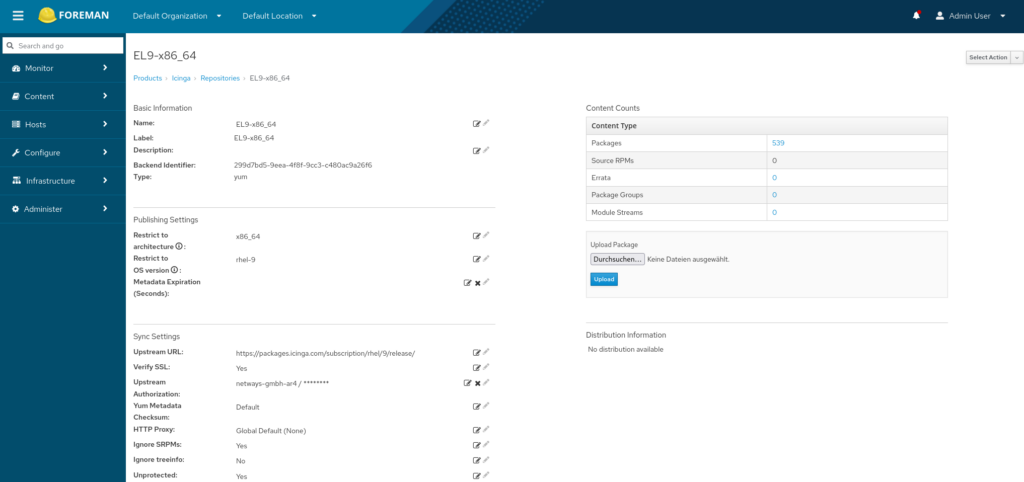
What you can’t see this time is that I have also stored the GPG key here. Also not to be seen, but hopefully everyone can imagine how to repeat this for each additional distribution and each version of it if needed. For example, I would then create “EL8-x86_64” or “SLES15.6-x86_64”.
Next steps
There are of course a few more steps, but I’m not yet sure in which order I would tackle them because it varies from environment to environment.
In any case, the mirrored repositories must also be used by the systems, i.e. I have to connect them here somehow. This can be done directly via the configuration of the package manager dnf/yum, zypper or apt, if you can do without the features of the subscription manager and ideally have simply rolled out such a configuration to all systems using Ansible, for example. With the Subscription Manager, you have control from a central location and can easily assign the repositories via the Katello GUI if required. Neither is an option for Windows, but neither is necessary thanks to the capabilities of Icinga for Windows, as it virtually takes on the role of package manager itself.
Another step would be to think about staging. By defining a lifecycle environment path consisting of development, testing and production, for example. Similar to the creation, versioning and deployment of content views in these stages, it can be ensured that updates are only made available after successful testing in the previous, less critical stage. In the case of Icinga, it can also be ensured that the supported update path of “Master first, then Satellites, then Agents” is reliably adhered to.
Another conceivable step would be to automate the configuration in Katello. I really like to do this in order to have reproducibility, but above all to save myself and the customer clicking. Ansible with the collection theforeman.foreman is again suitable for this.
And of course Icinga is just one good example, many other projects have their own repositories where it also makes sense to mirror them in your own environment. Of course, I’m thinking primarily of tools from our portfolio such as Grafana or Elasticsearch, but I’m sure you can also find examples in your IT environment.
Depending on the situation, the whole thing can of course also be extended to other content. For example, for Ansible to realize access to collections and roles and, if required, to filter them so that only checked content is used. Or through the possibility of making containers available as a container registry and avoiding restrictions such as the rate limit of Docker Hub.
Conclusion
I hope the advantage of a local package mirror is obvious, the blog post showed how easy a local mirror is with Katello and why I’m glad Icinga for Windows supports it. I will probably ask other projects to support Katello in the future if they provide their own repository like Icinga for Windows. In fact, I have already asked the Foreman project itself whether this can be set up for the discovery image. If others do the same, everyone will benefit.
Hopefully I have given you as a reader something that will help you not only with setting up Icinga repositories in Katello, but also beyond that. If you haven’t looked into the subject yet, but are now interested, take a look at our page on Foreman to get started and discover what else the foreman can do for you. You can find even more information in our training course on Foreman, which we developed and published together with the Foreman project as the official training course for the tool. And, as always, we also offer advice, support and outsourcing on this topic.
The header image combines the Deliveryman from oksmith by Openclipart with the logos of the projects.