

Elastic Consulting
Log & event management
Are your logs, metrics, and security events scattered across many systems? Through our Elastic consulting services, we’ll work with you to build an Elastic Stack that lets you search everything centrally, analyze data in real time, and detect security incidents early.

Does this sound familiar to you?

Logs are scattered everywhere
Each server writes its own logs. When a problem occurs, your team logs in to one system after another and manually searches for the cause.

Security incidents go unnoticed
An attack leaves traces in the firewall, server, and application. Without centralized analysis, no one will piece these events together, and suspicious patterns will go undetected.

The audit is missing supporting documentation
Local logs are rotated and overwritten after a few days. If an auditor asks for supporting documentation or if you need to investigate an incident, the data is missing.
What Elastic Can Do
Elastic makes logs, metrics, and security events searchable and analyzable in real time. Whether for troubleshooting, security, or capacity planning.

Real-time analysis
Elasticsearch searches through large volumes of structured and unstructured data in near real time. With the full-text search, you can find events without having to wait a long time for results.

Visualization and dashboards
Kibana turns your data into interactive dashboards, charts, and maps. This is how you can identify patterns that are hidden in raw data.

Consolidate data centrally
With Beats and Logstash, you can collect logs and metrics from all sources and consolidate them in one place, instead of searching through individual silos.

Safety at a glance
Suspicious patterns and anomalies stand out immediately. This allows you to use Elastic as the basis for your SIEM and detect security incidents before they become a problem.

Scaled with your data
Elastic scales with your data volume: New nodes expand the cluster, and replication ensures that it remains available even if individual nodes fail.

Fast troubleshooting
Instead of sifting through log files, you can use a simple query language and auto-complete to find the right information in seconds and solve problems faster.
Why Set Up Elastic with NETWAYS?
We have been operating open-source infrastructures for over 30 years and offer our own Elastic training courses. At Elastic Consulting, our consultants don’t just set up the stack—they also explain to your team how it works.
The Elastic Dashboard in Everyday Use
Here you’ll find an overview of the Elastic web interface, which clearly explains the various components and features of the dashboard.
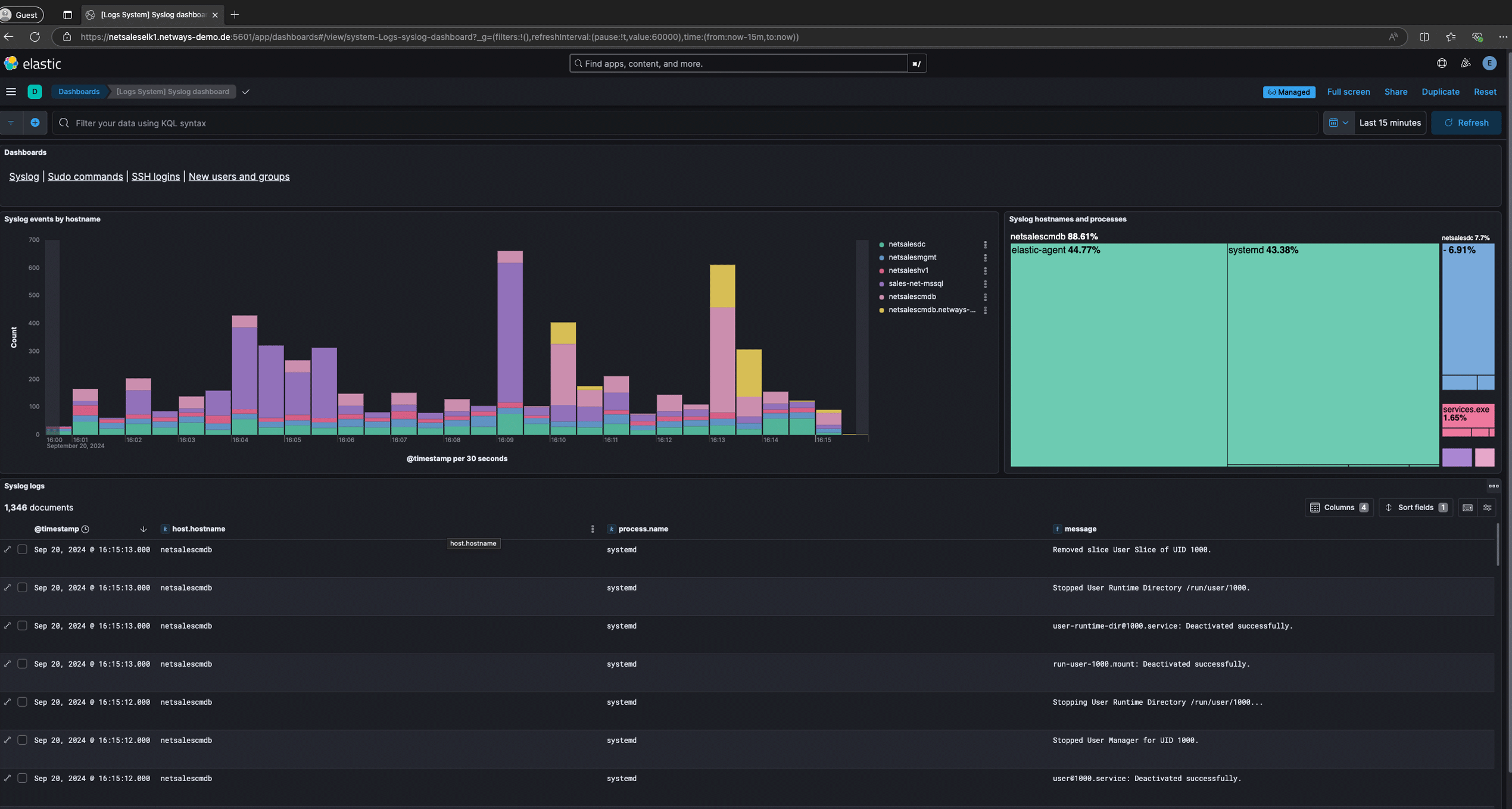
Quick navigation between individual dashboards.
Visualize your log data in tabular form or with a variety of graphical views.
Get a quick overview of which systems are part of the view.
Get quick access to your log information with detailed information.
Adjust the time period for the information displayed quickly and with just a few clicks.
Use a simple query language with auto-complete functions to quickly filter for specific fields and content.
Here’s How Your Elastic Consultation Works
Four Steps to an Elastic Stack That Runs Stably Even Under Heavy Load.
Analysis & Concept
We look at your data sources and infrastructure and plan together which logs, metrics and data should be indexed. From our experience with hundreds of projects, we know the pitfalls. This is how you can avoid excessive data volume and a cluster that crashes under the load.
Setup & Integration
We set up clusters, index structures, ingest pipelines and Kibana dashboards precisely for your teams and systems. Well-thought-out data mapping will save you from costly reindexing later on. From the very beginning, we focus on a structure that scales with your data growth.
Commissioning & visualization
Your stack goes live, data flows in in real time and becomes visible in meaningful dashboards. Here's how to avoid data graveyards where no one can find anything. Relevant information can be searched immediately and understood at a glance.

Support & Operations
On request, we can take over ongoing operations completely (outsourcing) or support your team with support and training. Cluster updates, shard management, and availability take up a lot of time internally. We keep your stack running smoothly and reliably so you can focus on analyzing your data.
Pricing for Your Elastic Consulting Services
Three ways to get started with our Elastic Consulting—each package delivers a concrete result that your team can use to continue working right away.
Elastic Review
Are you already using Elastic? We'll look at it together and show you where it's stuck.- Analyse deiner bestehenden Cluster & Architektur
- Prüfung von Performance, Shard-Strategie und Index-Lifecycle
- Check deiner Ingest-Pipelines und Mappings
- Konkrete, priorisierte Handlungsempfehlungen
- Gemeinsame Besprechung der Ergebnisse mit deinem Team
- Unser Vorgehen: In einem gemeinsamen Tag mit dir besprechen wir die offenen Themen, erarbeiten unsere Empfehlungen und präsentieren dir abschließend die Ergebnisse.
- Dein Ergebnis: Eine klare To-do-Liste, mit der du genau weißt, wo es klemmt und was als Nächstes zu tun ist.
Strategy workshop
Together we will clarify which data you want to analyze and the best way to do this.- Aufnahme deiner Anforderungen, Ziele und Rahmenbedingungen
- Bewertung deiner aktuellen Daten- und Logging-Landschaft
- Architektur-Empfehlung passend zu deiner Umgebung (Sizing, Hot/Warm/Cold)
- Tooling-Empfehlung (Elastic & sinnvolle Ergänzungen wie Beats, Logstash)
- Konkreter Umsetzungs-Fahrplan mit nächsten Schritten
- Unser Vorgehen: In einem gemeinsamen Tag mit dir besprechen wir die offenen Themen, erstellen den Fahrplan für deine Umgebung und präsentieren dir abschließend ausführlich die Ergebnisse.
- Dein Ergebnis: Ein belastbarer Plan, mit dem dein Team die Umsetzung sofort und ohne Umwege angehen kann.
Proof of concept
We set up an initial executable search and log environment with you - for you to touch.- Set up a test environment with real data from your systems
- Setting up the first Kibana dashboards for an overview
- Configuration of a functioning search and alerting logic
- Integration of an exemplary data source (e.g. logs or metrics)
- Knowledge Transfer and Training for Your Team inYour Environment Our Approach: During a one-day session with you, we’ll discuss the outstanding issues, create a proof of concept (in collaboration with you), and conclude by presenting the results to you.
- Your result: A functioning demo environment as a tangible basis for the decision and the subsequent real system.
Training Courses on the Elastic Stack
Our training course gives you the opportunity to further develop the Elastic Stack on your own. This can be done as a supplement to our Elastic consulting services or independently of them.
Get an introduction to the Elastic Stack in our Elastic Stack training and learn the basic techniques of log transfer, processing, storage, evaluation and analysis!
Expertise in Elastic
Want to dig deeper? You might find these blog posts about Elastic interesting.
Ansible and the Elastic Stack
Last updated: August 6, 2026 · Reading time: 4–6 minutes In this article, I’d like to introduce you to the Ansible Collection netways.elasticstack, which allows you to automatically deploy and manage Ansible and the Elastic Stack (Elasticsearch, Logstash, Kibana,...
Filebeat and Metricbeat – Visualizing Your First Logs with Elastic and Kibana
Last updated: July 9, 2026 · Reading time: 2–3 minutes Elasticsearch is running, Kibana is set up, but how does the data actually get into the stack? The answer lies in what are known as "Beats": lightweight data collectors that run in the background and forward data...
What is the ELK Stack? Elasticsearch, Logstash, and Kibana Explained Simply
Last updated: July 9, 2026 · Reading time: 2–4 minutes Anyone involved in monitoring, log analysis, or searching through large amounts of data will sooner or later come across the ELK Stack. The ELK Stack consists of three different tools: Elasticsearch, Logstash, and...
Frequently Asked Questions About Elastic
What is the Elastic Stack?
The Elastic Stack is a platform for search, log analysis, and security, consisting of Elasticsearch, Logstash, Kibana, and Beats. It used to be called the ELK Stack. Elasticsearch stores and searches the data; Logstash and Beats collect it; Kibana visualizes it. You can read more about this in our article " What Is the ELK Stack?"
How much does an Elastic consultation cost at NETWAYS?
An Elastic consultation at NETWAYS starts at €2,000 for a review of your existing installation. We also offer a strategy workshop (€4,000) and a proof of concept using real data from your environment (€8,000) at a fixed price, plus VAT. We bill larger projects on a time-and-materials basis once we know your requirements.
Elastic is free to use, after all. Why do I need counseling?
It's worth getting advice because it's not the license that requires effort, but rather the day-to-day operation: sizing, shard strategy, mappings, index lifecycle, and updates. Mapping errors often aren't noticed until an expensive reindexing becomes necessary. With an Elastic consultation, your stack will be up and running faster, and because we work directly within your environment during the consultation, your team will learn how to manage it on their own.
Do you also offer Elastic Support?
Yes, you can still get Elastic Support from us even after your consultation. Our team is here to help you with any questions you may have about cluster updates, mappings, and error messages in your environment. If you want to hand over operations entirely, we'll take them over as part of our outsourcing services.
Can I use Elastic as a SIEM?
Yes, with Elastic Security, you can use the Elastic Stack as a SIEM. You collect logs and security events centrally, apply detection rules, and investigate incidents directly in Kibana. You can find out more about our approach on the SIEM & Threat Detection page.
Who uses Elasticsearch?
Elasticsearch is used by companies and organizations that need to search and analyse large amounts of data quickly, such as in the area of log management, business analytics or for search functions on websites. Companies such as Netflix, Uber and Wikipedia use Elasticsearch to enable real-time searches in their applications. Development teams and data engineers also use it to efficiently search and visualize structured and unstructured data.
Is Elasticsearch a database?
Elasticsearch is not a classic relational database, but a search and analysis engine based on the open source software Apache Lucene. It is specially designed to quickly search and analyze large volumes of text-based and unstructured data in real time. Although Elasticsearch offers some database-like features such as data storage and retrieval, the focus is on powerful full-text search and analysis, not complex relational queries.
What is an Elasticsearch index?
An Elasticsearch index is a structure used to store, organize and manage data within Elasticsearch, similar to a database in traditional database systems. Each index consists of documents, which in turn contain fields with different data types. Indexes enable the quick search and analysis of stored data by saving and organizing it in segmented and distributed formats.
What is Elastic Beats?
Elastic Beats is a lightweight data collection and delivery platform that is part of the Elastic Stack. Beats consists of various agents that collect specific data sources such as logs, metrics or network data and send them to Elasticsearch or Logstash. This enables Beats to efficiently record and forward data in order to analyze or visualize it in real time.
What is an Elasticsearch Cluster?
An Elasticsearch cluster consists of multiple Elasticsearch nodes that work together to store, search and analyze large amounts of data. Each node takes on a specific role, such as storing data or processing queries, and all nodes share the load to increase efficiency. A cluster enables scalability and redundancy so that it continues to function reliably even if individual nodes fail.
Why Elasticsearch?
Elasticsearch is a powerful, distributed search and analysis engine that has been specially developed for fast full-text search and data analysis in large amounts of data. It is based on Lucene and offers a scalable and flexible architecture that makes it possible to access structured and unstructured data in real time. Typical use cases include searching log files, indexing text content and providing fast, relevant search results in web applications.
