

Icinga Consulting
Open Source Monitoring & Observability
Your infrastructure is growing, but you’re losing track of it? As part of our Icinga consulting services, we’ll work with you to set up a centralized monitoring system for servers, networks, and applications. This lets you monitor your entire IT infrastructure in real time, all in one tool.

Your Daily Life Without Monitoring

Users are the first to notice outages
You don’t find out about issues until someone calls or submits a ticket. The service has been down for quite a while now, and we still haven’t found the cause.

Problems arise without anyone noticing
Full hard drives, increasing load, or expiring certificates often become apparent days in advance. Without monitoring, no one will notice until the service goes down.

There is a lack of reliable figures for audits
If an auditor or management asks about the availability of your systems, you can only provide estimates.
What Icinga Does
Icinga gives you an overview of your entire infrastructure, alerts you to problems in a timely manner, and provides the documentation you need for audits.

Monitor everything
Servers, applications, networks, and any other data sources. We integrate all of this into a centralized monitoring system, with absolutely no restrictions.

Alerted immediately
Logically structured and prioritized notifications ensure that you can respond immediately if any problems arise. Don’t wait until it’s too late.

Clear reports
Meaningful SLA reports and dashboards for every use case give you a complete overview of all important business processes.

Scaling as you grow
From a single server to distributed data centers: Icinga scales with your environment, so you won’t have to rebuild your monitoring setup later.

Seamless integration
Using the open API and numerous interfaces, you can integrate Grafana, ticketing systems, ChatOps, and existing tools. Icinga integrates into your environment rather than replacing it.
Security through transparency
Complete historical data and verifiable SLA records ensure transparency. This applies to internal reviews as well as to audits and compliance requirements.
Why set up Icinga with NETWAYS?
We have been operating open-source infrastructures for over 30 years. We’ve been working with Icinga ever since it was launched. At Icinga Consulting, you’ll receive advice from the same team that conducts our Icinga training sessions. This way, you’ll have ongoing monitoring and the knowledge to further develop it on your own.
An Overview of the Icinga Web Interface
Here you’ll find an overview of the Icinga web interface, which clearly explains the various components and features of the dashboard.
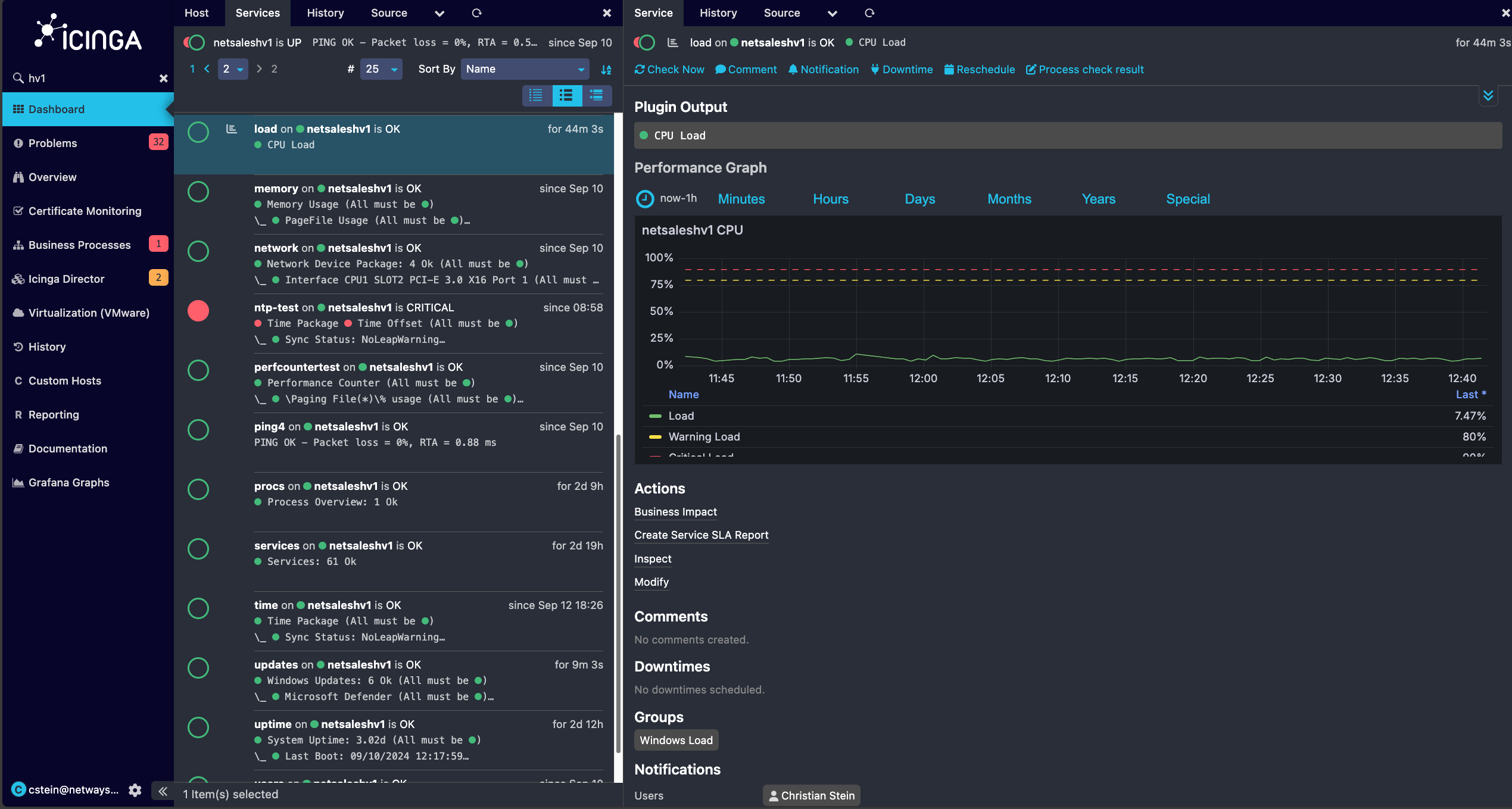
Icinga Web offers simple tab navigation to quickly jump to important information.
If you click on elements in Icinga, a new view opens on the right-hand side and allows you to quickly jump between views.
Performance data can be embedded and displayed directly in Icinga Web via modules such as Grafana.
Get a quick overview of whether a check is OK or whether problems have been found.
In the list view of the service checks, you can quickly see whether there are any current problems.
Icinga displays a notification in the navigation menu when modules report information, warnings, or issues.
Personalized registration! Icinga Web allows connection to directory services such as Active Directory and thus offers full multi-client capability.
The Icinga Web navigation bar can be extended with custom PHP modules or filtered views in menu structures.
Using the action bar, various interactions such as setting downtimes, re-scheduling checks or acknowledging problems can be carried out quickly and easily.
Quickly recognize when a problem has occurred or how long it has been okay again.
Here’s How Your Icinga Consultation Works
You don’t have to build Icinga alone. We’ll guide you every step of the way and continue to support you even after that.
Analysis & Concept
We look at your infrastructure and plan together what needs to be monitored and how. From our experience with hundreds of projects, we know the pitfalls. This is how you avoid blind spots and monitoring that triggers alerts in the wrong places.

Setup & Integration
We set up checks, dashboards and alerts tailored to your teams and systems. A well-thought-out design will save you from costly modifications down the road. From the very beginning, we've focused on a structure that grows with us.
Commissioning & alarming
Your monitoring goes live, notifications are logically prioritized and sent to the right people. Here's how to avoid alert fatigue, which can cause real problems to go unnoticed.

Support & Operations
Upon request, we can take over day-to-day operations entirely (outsourcing) or assist your team with support and training. Updates, backups, and ensuring availability take up a lot of time internally. We keep your monitoring running smoothly so you can focus on your core business.
Pricing for Your Icinga Consulting Services
Three ways to get started with our Icinga Consulting—each package delivers a concrete result that your team can use to continue working right away.
Icinga Review
Are you already using Icinga? We'll look at it together and show you where it's stuck.- Analysis of your existing installation & architecture
- Testing performance, scaling and configuration
- Check your alerting and notification logic
- Concrete, prioritized recommendations for action
- Joint discussion of the results with your team
- Our approach: We’ll discuss the outstanding issues during a one-day workshop and work together to develop recommendations.
- Your result: A clear to-do list that lets you know exactly where things are stuck and what needs to be done next.
Strategy workshop
Together we will clarify what you want to monitor and the best way to get there.- Recording your requirements, goals and framework conditions
- Evaluation of your current IT and monitoring landscape
- Architecture recommendation to suit your surroundings
- Tooling recommendation (Icinga & useful additions)
- Concrete implementation roadmap with next steps
- Our approach: In a joint day with you, we discuss the open topics, create the roadmap for your environment and then present the results to you in detail.
- Your result: a resilient plan that your team can use to tackle implementation immediately and without detours.
Proof of concept
We will set up an initial operational monitoring environment with you - for you to touch.- Set up a test environment with real checks of your systems
- Setting up initial dashboards for an overview
- Configuration of a functioning alarm system
- Integration of an exemplary data source (e.g. Grafana)
- Knowledge transfer and training of your team on the environment
- Our approach: In a joint day with you, we discuss the open topics, create a PoC (in cooperation with you) and finally present the result to you.
- Your result: A functioning demo environment as a tangible basis for the decision and the subsequent real system.
Icinga Training Courses
Learn how to efficiently monitor and analyze complex infrastructure.
Icinga for Beginners
Are you new to Icinga? This training course covers the basics of using and configuring Icinga 2 and Icinga Web 2 in combination with Icinga Director. This is further illustrated through practical exercises, real-world examples, and best practices.
Icinga for Advanced Users
Are you already working with Icinga and want to dive deeper into it? In this training course, you’ll deepen your knowledge of Icinga 2, Icinga Web 2, and Icinga Director using examples from real-world projects. You’ll also receive best practices that will help you make targeted improvements to your existing environment.
Managed Icinga
Your fully preconfigured monitoring stack
Our Managed Icinga Master is your one-stop solution for monitoring your IT infrastructure. It reliably shows you around the clock where problems are occurring in your area, so you can respond quickly. With the managed version, you benefit from automatic updates, regular backups and an Icinga installation that is always up to date. The app is up and running, so you can focus entirely on ensuring your infrastructure runs smoothly.


Expertise in Icinga
Want to dig deeper? You might find these blog posts about Icinga interesting.
Icinga 2 Installation Overview: All Guides for Ubuntu & RHEL
Last updated: October 1, 2026 · Reading time: 2–3 minutes Icinga 2 is the foundation for reliable open-source monitoring. However, what the Icinga 2 installation looks like depends on the operating system and the components you actually need. This overview brings...
ServiceNow CMDB Import for Icinga Director
Last updated: September 24, 2026 · Reading time: 3–4 minutes Manually transferring ServiceNow CMDB data into Icinga Director takes time and quickly results in outdated data. The Icinga Web 2 module " icingaweb2-module-servicenow-import " from NETWAYS fills this gap:...
ServiceNow Integration for Icinga
Last updated: September 10, 2026 · Reading time: 8–9 minutes If Icinga reports a critical outage but no one at the service desk notices it, the alert goes unacted upon. Using the open-source repositories icinga-servicenow and icinga-servicenow-web, you can connect...
Alertmanager-Icinga-Bridge – A Signalilo Fork
Last updated: July 30, 2026 · Reading time: 2–3 minutes Alertmanager and Icinga do not communicate with each other by default. If you want to process Prometheus alerts centrally via Icinga, you need a bridge between the two systems. That's exactly what the...
Ansible Icinga Collection
Last updated: July 16, 2026 · Reading time: 4–6 minutes With Ansible and Icinga, you can automate the setup of your entire monitoring environment. The " netways.icinga " collection brings together eight roles that handle exactly these recurring steps for you. We'll...
Bug Fix Release: Icinga 2 v2.16.3, v2.15.5, v2.14.10
Shortly after the release of the latest security updates, there's some news: Users who have enabled the " Json.decode() " feature in their settings were surprised by an unpleasant side effect. As part of one of the security fixes, the internal C++ function `...
Frequently Asked Questions About Icinga
Is Icinga free and open source?
Icinga is open source and is licensed under the GNU General Public License, Version 2; all source code is freely available. The Icinga project provides ready-to-use packages for the most important community Linux distributions free of charge. For the official packages for Enterprise Linux distributions (RHEL, SLES, Amazon Linux) and for certain Icinga modules, either an Icinga subscription or an Icinga support contract is required.
How much does an Icinga consultation at NETWAYS cost?
An Icinga consultation at NETWAYS starts at €2,000 for a review of your existing installation. We also offer a strategy workshop (€4,000) and a proof of concept with real-world testing of your systems (€8,000) at a fixed price, plus VAT. We bill larger projects on a time-and-materials basis once we know your requirements.
Icinga is free, after all. Why do I need counseling?
It's worth getting advice because the effort isn't in the license itself, but in the setup: architecture, checks, alerting logic, and automation. Without experience, you can quickly end up with a monitoring system that either generates too many alerts or alerts in the wrong places. With an Icinga consulting project, your monitoring system will be up and running faster, and because we work directly within your environment during the consulting process, your team will learn how to manage it on their own.
What is the difference between Nagios and Icinga?
Both Nagios and Icinga are open source monitoring tools, whereby Icinga was originally created as a fork of Nagios. Icinga offers a more modern user interface, supports a more powerful API and offers better scalability in large environments. However, Nagios is still widely used and has a large community as well as a large number of plugins and extensions. However, all Nagios plugins can also be used with Icinga, so migrating from Nagios to Icinga is the best way to switch to an up-to-date and active platform.
What can Icinga monitor?
Icinga can monitor a wide range of IT infrastructures, including servers, networks, applications and services. Icinga monitors both physical and virtual environments and can capture metrics such as CPU utilization, disk space, network availability and service response times. Custom plugins allow Icinga to be flexibly extended to monitor almost any type of system or process.
How does Icinga work?
Icinga is an open source monitoring tool that monitors IT infrastructures by checking hosts, services and networks in real time. It collects and analyzes data such as availability, performance and resource usage and warns of problems or failures via notifications. Thanks to its flexible architecture and integration with other tools such as Grafana and Prometheus, Icinga is suitable for both small and complex environments for monitoring and problem detection.
What does Icinga do?
Icinga monitors IT infrastructures by continuously checking servers, networks and applications for availability, performance and errors. It notifies administrators in the event of problems or failures, enabling a rapid response before critical faults occur. It also offers dashboards for visualizing system statuses and can be flexibly adapted to different environments using plugins and integrations.