



Last updated: September 10, 2026 · Reading time: 8–9 minutes
If Icinga reports a critical outage but no one at the service desk notices it, the alert goes unacted upon. Using the open-source repositories icinga-servicenow and icinga-servicenow-web, you can connect Icinga directly to ServiceNow: Notifications are automatically converted into incidents—no manual copying and pasting required. This guide shows you what you need and how to install and configure both components.
The most important points in 30 seconds
- Two open-source repositories connect Icinga and ServiceNow: icinga-servicenow (daemon) and icinga-servicenow-web (IcingaWeb2 module).
- Icinga notifications are automatically converted into ServiceNow incidents, updated, and closed.
- The daemon runs as its own systemd service and does not require a separate server, but it does need its own SQL database (MySQL, MariaDB, PostgreSQL, or SQLite).
- This requires an existing Icinga environment and a ServiceNow instance with read/write access to the incident table.
Why Connect Icinga and ServiceNow?
Imagine that your Icinga reports a critical server failure, but no one at the service desk notices it because the alert gets stuck exclusively in Icinga Web. In many companies, ticketing is handled through ServiceNow, but monitoring is handled through Icinga. Without integration, employees have to manually convert alerts into incidents by copying and pasting. This leads to potential sources of error, and the time lag is also longer.
NETWAYS provides two open-source repositories for this purpose that directly connect Icinga and ServiceNow. Icinga notifications are automatically converted into ServiceNow incidents.
ServiceNow and Integration with Icinga
ServiceNow is a cloud platform for IT service management (ITSM). Companies use them primarily for incident, change, and asset management—that is, to centrally manage incidents, changes, and their own IT infrastructure (CMDB). UnlikeIcinga, ServiceNow does not monitor systems itself; instead, it manages the processes and tickets related to IT operations.
In practice, this is precisely what often leads to a gap. Icinga reliably detects when a host or service goes down, but this information is initially visible only in the monitoring interface. In order for an event to appear as an incident in ServiceNow—where it can be assigned to the service desk, processed, and documented—this information must first be transferred there.
This integration fills exactly that gap. Icinga notifications are automatically converted into ServiceNow incidents, updated, and closed.
This allows for closer integration between monitoring and ITSM without anyone having to manually transfer alerts back and forth between the two systems.
Introduction to the Repos
The two repositories are independent of each other but work great together.
icinga-servicenow is at the core; the daemon is written in GO. It runs as a separate system service and receives notifications from Icinga. It converts them into ServiceNow incidents, stores its own status in an SQL database (MySQL, PostgreSQL, or SQLite), and regularly synchronizes this status with ServiceNow.

icinga-servicenow-web is an Icingaweb2 module. It provides the graphical user interface for viewing open ServiceNow incidents directly on the host or service in Icinga Web, as well as the CLI (icingacli servicenow), which is used to send notifications to the daemon in the first place.
Requirements for the ServiceNow Integration with Icinga
This integration builds on an existing Icinga environment. If you don’t have one yet, you’ll find the instructions you need in our article series ” Basic Icinga Installation.”
For the daemon
- The daemon runs as a separate systemd service and does not require a separate server to do so.
- Go version 1.24.4 should be installed
- A database (MySQL, MariaDB, or PostgreSQL)
- Login credentials for a ServiceNow instance using a user who has read/write access to the Incident table.
For the Web module
- A running Icinga Web 2 installation
Step 1: Set up the database for the daemon
First, clone the repository; it also contains the database schemas we’ll need shortly.
git clone https://github.com/NETWAYS/icinga-servicenow.git
cd icinga-servicenowThe daemon requires its own database to store its incident status. Using MySQL as an example:
mysql -u root -pCREATE DATABASE servicenow CHARACTER SET utf8mb4;
CREATE USER 'servicenow'@'localhost' IDENTIFIED BY 'DeinSuperSicheresPasswort';
GRANT ALL PRIVILEGES ON servicenow.* TO 'servicenow'@'localhost';
EXIT;Next, import the included schema.
mysql -u servicenow -p servicenow < schema/mysql/schema.sqlStep 2: Install and Configure the Daemon
First, we’ll build the binary.
go build -o icinga-servicenow ./cmd/icinga-servicenowUse the included `config.example.yml` file as a basis for your own `config.yml` file.
database:
  type: mysql
  host: 127.0.0.1
  port: 3306
  user: servicenow
  password: DeinSuperSicheresPasswort
  name: servicenow

servicenow:
  url: "https://deine.service-now-adresse.com"
  user: "ServiceNow_Icinga"
  password: "SuperSicheresPasswort"

incident_table_endpoint: "/api/now/v2/table/incident"
incident_state_mapping:
  Problem: "1"
  Acknowledgement: "2"
Recovery: "6"To test it quickly, you can start the daemon directly like this:
./icinga-servicenow -config config.ymlFor continuous operation, the daemon expects the configuration file to be located by default at /etc/icinga-servicenow/config.yml and provides a ready-to-use systemd unit file in the contrib/icinga-servicenow.service, which requires the binary to be located at /usr/bin/icinga-servicenow and a system user named icinga-servicenow:
systemctl enable --now icinga-servicenowYou can use `systemctl status icinga-servicenow` to check whether the service is running and whether the database and ServiceNow were successfully pinged.

Step 3: Install the Web Module
The web module is integrated just like a standard Icinga web module:
git clone https://github.com/NETWAYS/icinga-servicenow-web.git /usr/share/icingaweb2/modules/servicenow
icingacli module enable servicenowNext, the configuration directory is created:
install -d -m 2770 -o www-data -g icingaweb2 /etc/icingaweb2/modules/servicenowNext, the config.ini file is populated with the daemon address:
sudo vim /etc/icingaweb2/modules/servicenow/config.ini[servicenow]
api_url = "https://icinga-servicenow-daemon:5910"
api_timeout = "10"
instance_url = "https://my.service-now.com"
[db]
resource = "servicenow_db"Step 5: Connect Icinga 2 to the daemon
To ensure that Icinga automatically sends a notification to the daemon when problems arise, a NotificationCommand is required. This is Icinga 2’s own configuration language, which belongs in a .conf file, for example:
sudo vim /etc/icinga2/conf.d/servicenow-notifications.confIf you’re working with zones, the relevant section is located here instead:
sudo vim /etc/icinga2/zones/deine-zones/The NotificationCommand for hosts is now stored here:
object NotificationCommand "servicenow-host-notification" {
  command = [ "/usr/bin/icingacli", "servicenow", "send", "notification" ]

  arguments += {
    "--host" = {
      required = true
      value = "$notification_hostname$"
    }
    "--output" = {
      required = true
      value = "$notification_output$"
    }
    "--state" = {
      required = true
      value = "$notification_state$"
    }
    "--type" = {
      required = true
      value = "$notification_type$"
    }
    "--name" = {
      required = true
      value = "$snow_name$"
    }
    "--template" = {
      value = "$snow_template$"
    }
    "--extra" = {
      value = "$snow_additional_fields$"
    }
  }

  vars += {
    notification_type = "$notification.type$"
    notification_hostname = "$host.name$"
    notification_output = "$host.output$"
    notification_state = "$host.state$"
    notification_name = "$snow.name$"
    notification_template = "$snow.template$"
    notification_extra = "$snow_additional_fields$"
  }
}This command still needs a notification template that specifies which event types will trigger a notification. Just add them at the bottom of the same document:
template Notification "snow-host-notification" {
  command = "servicenow-host-notification"

  types = [ Problem, Acknowledgement, Recovery, Custom,
            FlappingStart, FlappingEnd,
            DowntimeStart, DowntimeEnd, DowntimeRemoved ]
}The template you created cannot be used yet without a host. In this example, it is assigned directly to the host object.
apply Notification "snow-host-notification" to Host {
  import "snow-host-notification"

  assign where host.vars.snow_name
}Now save, check the configuration, and reload Icinga 2:
sudo icinga2 daemon -C
sudo systemctl restart icinga2Practical example of the ServiceNow integration for Icinga:
Step 1: Create a template in Daemon
Before a template can be used in a notification, it must be created once in the daemon. The template defines how Icinga variables are mapped to ServiceNow fields.
curl -X POST -H "Content-Type: application/json" http://localhost:5910/api/v1/template \
  -d '{
    "display_name": "mytemplate",
    "fields": {
      "ci_item": "$host.name$.example.localhost",
      "short_description": "$notification.output$",
      "caller_id": "sys_id_deines_servicenow_benutzers"
    }
}'In this example, $host.name$ is automatically replaced with the actual hostname when the incident is created, and $notification.output$ is replaced with the notification text. “caller_id” must be replaced with the Sys-ID of a real user in your own ServiceNow instance.
Step 2: Send a notification using the template
Now let’s test the template we created:
icingacli servicenow send notification --state Critical --type Problem \
  --output "This host is on fire!" \
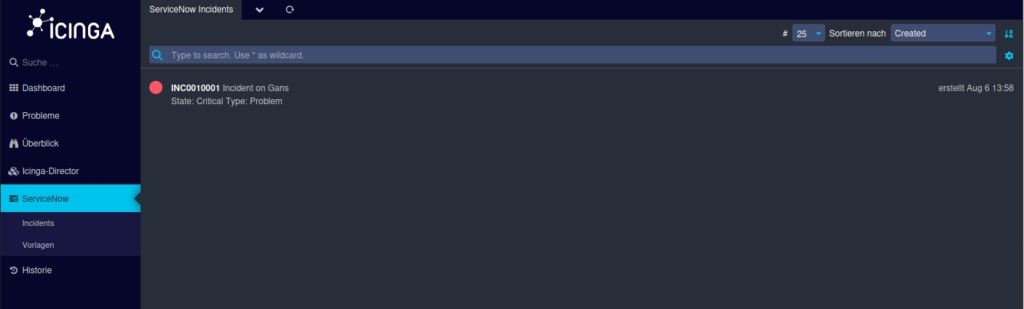
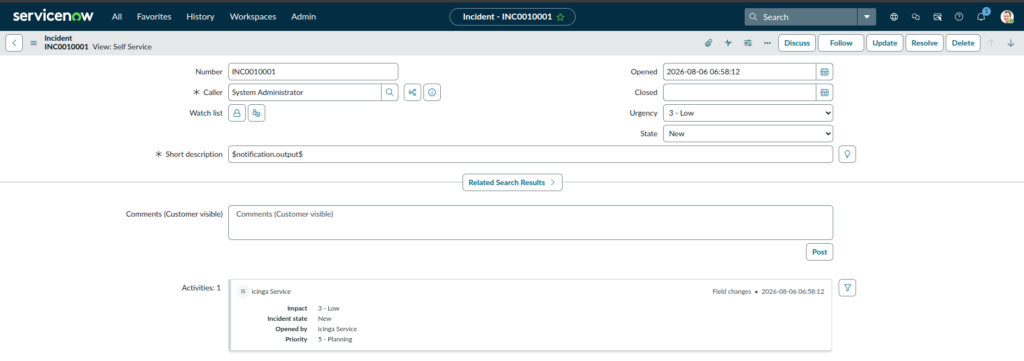
--host Gans --name "generic" --template "mytemplate"In Icinga, the incident we created is displayed under the “Incidents” section. At the same time, an incident is automatically created in ServiceNow (Fig. 2).
Conclusion on the ServiceNow Integration for Icinga
Using the two repositories, icinga-servicenow and icinga-servicenow-web, Icinga can be seamlessly integrated with ServiceNow: Alerts are automatically converted into incidents, and open incidents are directly visible in Icinga Web.
