

Snipe IT
All assets at a glance
With Snipe-IT, we provide you with open source software for managing IT assets, with which you can track hardware, software licenses and accessories in your company.

From the idea to ongoing asset management
You don’t have to build Snipe-IT alone. We accompany you step by step – and stay by your side afterwards.
Analysis & Concept

Setup & Integration

Commissioning & management

Support & Operations
Snipe-IT Features
More overview instead of extra work: Snipe-IT ensures transparent asset management, reduces manual effort and helps you keep track of audits at all times.

Central asset management

Users and locations

Notifications
License management

User-defined fields

QR code & barcode labels
Snipe-IT web interface
The screenshot shows an overview of the Snipe IT web interface, in which the various components and functions of the dashboard are clearly explained.
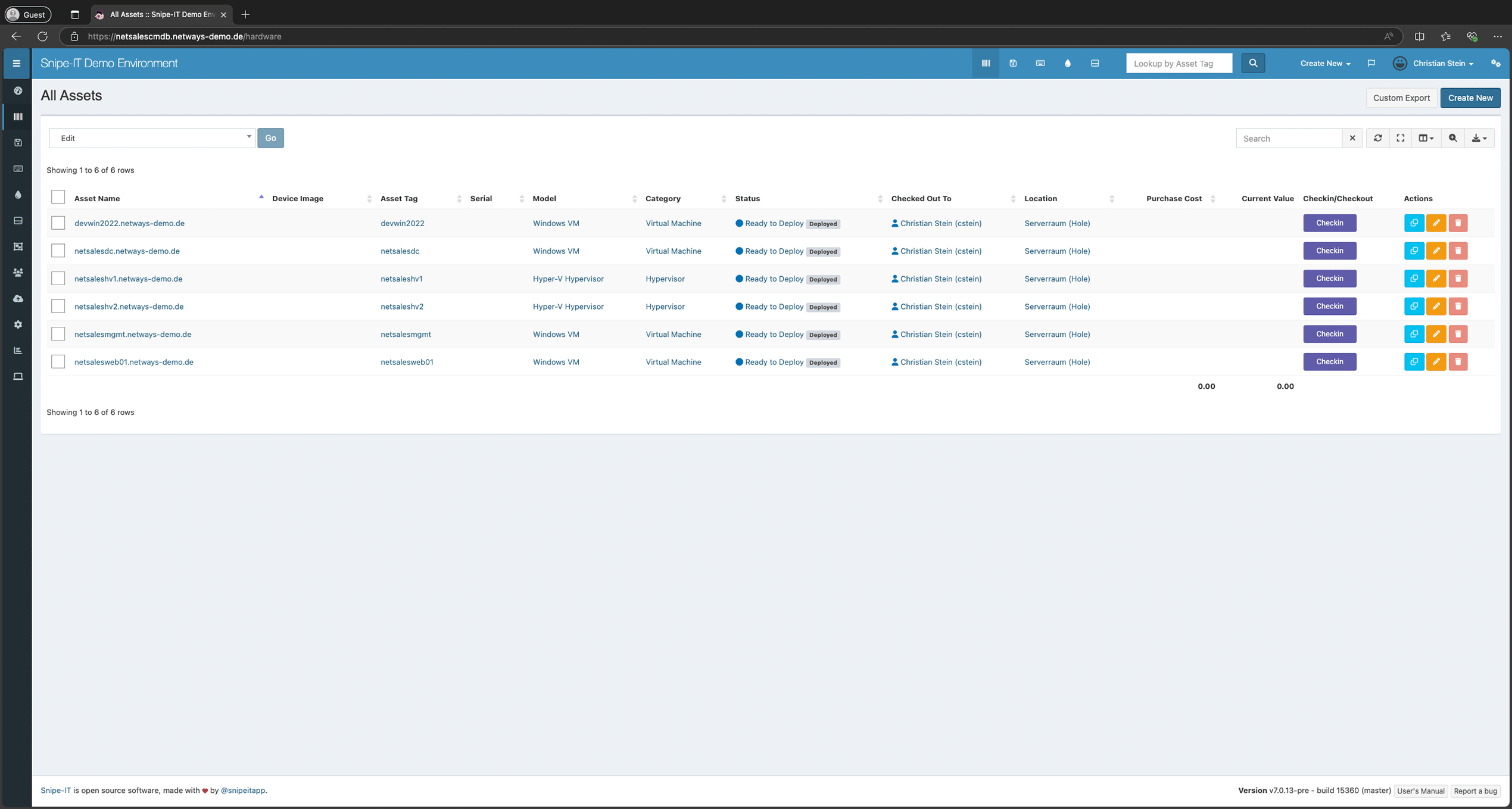
Overview all your assets in a simple, easy-to-search list.
Connect Snipe-IT to directory services such as Active Directory for easy user, role and rights management.
Quickly create new assets manually via the interface and use stored information such as companies, locations or users to quickly fill them with the correct content.
Categorize your assets to get a quick overview of which type they belong to.
Quickly find out whether an asset has currently been delivered and to which user it is assigned. This significantly simplifies the traceability of assets.
Store the location for static assets so that you can quickly see where they are currently located.
Start small, make clear progress
You don’t have to start a big project right away. Choose the entry point that suits your situation – each step provides you with a concrete result.
Snipe-IT Review
Are you already using Snipe-IT? We'll look at it together and show you where it's stuck.- Analysis of your existing Snipe IT structure and system configuration
- Checking asset types, categories, status models and mandatory fields
- Check your user, role and authorization concepts
- Concrete, prioritized recommendations for action for optimization and clean-up
- Joint discussion of the results with your team
- Our approach: In a joint day with you, we discuss the open issues, work out our recommendations and finally present the results to you.
- Your result: A clear to-do list that lets you know exactly where things are stuck and what needs to be done next.
Strategy workshop
Together, we clarify which assets, licenses and processes you want to map and what the best way to do this is.- Recording of requirements, objectives and organizational framework conditions
- Evaluation of your existing inventory and documentation processes
- Structure recommendation for assets, accessories, licenses and locations
- Process recommendation for issue, return, onboarding and offboarding
- Concrete implementation roadmap for introduction or further development
- Our approach: In a joint day with you, we discuss the open topics, create the roadmap for your environment and then present the results to you in detail.
- Your result: a resilient plan that your team can use to tackle implementation immediately and without detours.
Proof of concept
We will set up your first working Snipe IT environment with you - so you can touch it.- Test environment with sample data from your day-to-day IT work
- Initial structure for assets, users, locations and categories
- Illustration of an example process for device issue and return
- Integration of a selected data source or import template
- Knowledge transfer and training for your team
- Our approach: In a joint day with you, we discuss the open topics, create a PoC (in cooperation with you) and finally present the result to you.
- Your result: A functioning demo environment as a tangible basis for the decision and the subsequent real system.
Questions & Answers
The most frequently asked questions about Snipe-IT
What is Snipe IT Asset Management?
Snipe-IT is an open source asset management software specifically designed to manage and track IT equipment such as laptops, servers, and other devices. It enables companies to monitor the life cycle of IT resources, maintain inventory, manage licenses and assign equipment to employees. Snipe-IT offers a user-friendly interface and numerous customization options for small to large organizations.
How do I install Snipe IT?
To install Snipe-IT, you need a server with PHP, MySQL/MariaDB and a web server such as Apache or Nginx. You can either install the software manually by downloading the source code from GitHub and configuring the required dependencies, or use an easier way like Docker to run the application in a container. After installation, set up the database, configure the environment files and start the application via the browser to complete the setup.
How do I update Snipe It Docker?
To update Snipe-IT in Docker, first stop the running Snipe-IT container with `docker stop `. Then pull the latest Snipe-IT Docker image with `docker pull snipe/snipe-it` and restart the container, making sure that the existing database and volume mappings are retained. After the restart, Snipe-IT will automatically migrate all necessary database changes, if required, and the updated version will be ready for use.
Does Snipe It have an API?
Yes, Snipe-IT offers a RESTful API that allows you to programmatically access many features of the software, such as creating, updating or querying assets, users and licenses. The API makes it possible to integrate Snipe-IT into other systems and create automations to make IT asset management more efficient. Authentication tokens are required to use the API, which can be generated via the Snipe IT admin interface.
Is Snipe IT Asset Manager open source?
Yes, Snipe-IT is open source software and is published under the GNU Affero General Public License (AGPL). This means that the source code is freely available and users can use, adapt and further develop the software free of charge. In addition, we offer paid support and hosted versions of Snipe-IT for companies that prefer professional services or a managed solution.
What can I use Snipe IT for?
Snipe-IT can be used to manage and track the lifecycle of IT assets such as computers, monitors, licenses and accessories. It helps companies to maintain device inventories, monitor assignments to employees and keep track of maintenance or warranty information. With its user-friendly interface and API integration, Snipe-IT facilitates the organization and control of IT resources in small to large companies.
