

Grafana
Log management system
Grafana Loki manages large log volumes in a resource-saving manner without complete indexing. The open source tool integrates seamlessly with Grafana to analyze logs and metrics together.

From the idea to the running dashboard stack
You don’t have to build Grafana alone. We accompany you step by step – and stay by your side afterwards.

Analysis & Concept

Setup & Integration

Commissioning & visualization

Support & Operations
Grafana features
All data in one place, clearly presented: Grafana brings your metrics, logs and traces together in one dashboard – so you can recognize correlations and make informed decisions faster.

Any data source
Individual dashboards

Monitoring & alerting

Metrics, logs & traces combined

Share & collaborate
Diverse visualizations
Grafana web interface
The screenshot shows an overview of the Grafana web interface, in which the various components and functions of the dashboard are clearly explained.
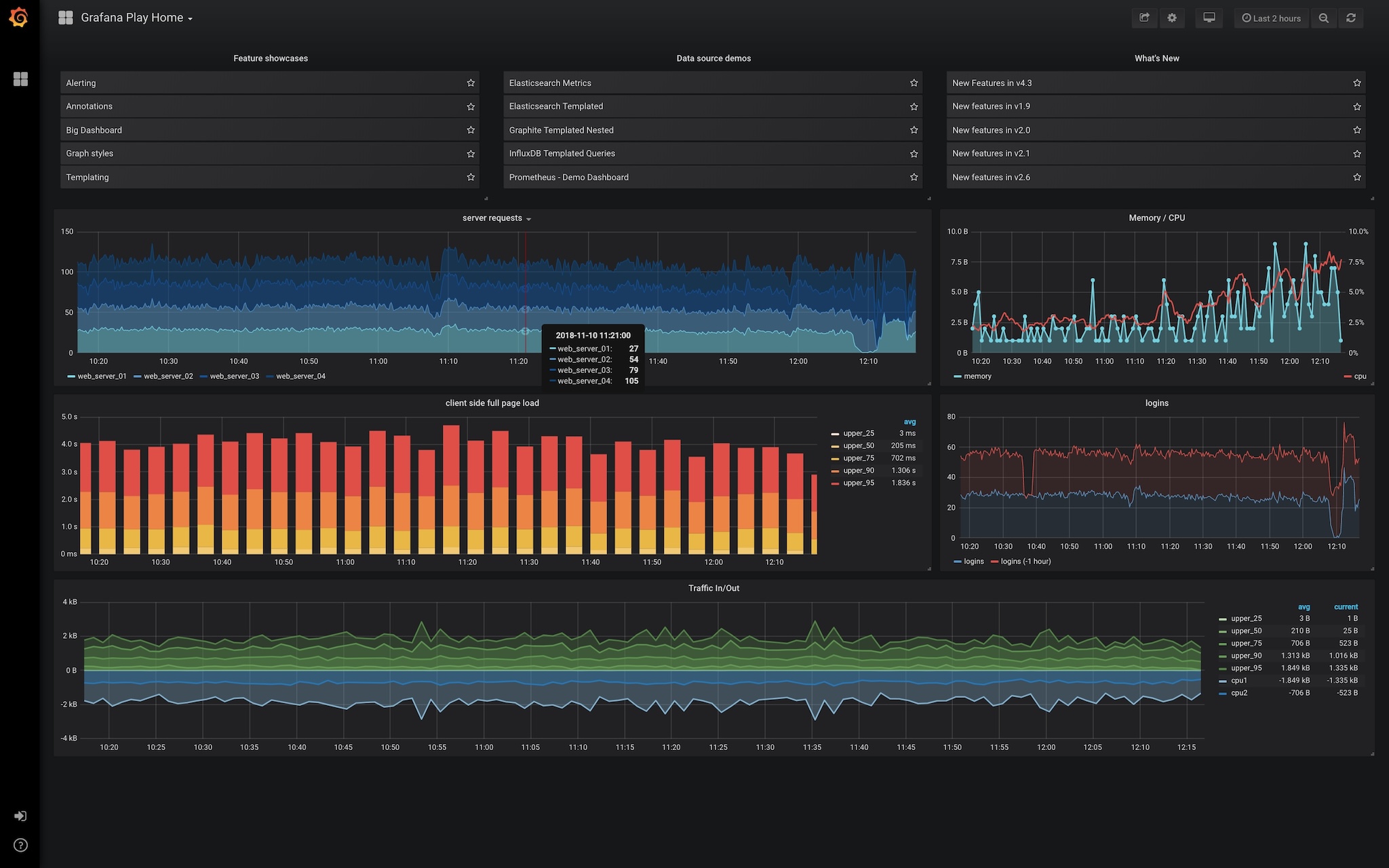
Jump quickly between different dashboards.
Log in with your own access data or use the option of attaching Grafana to a directory service such as Active Directory.
Use various visualization options, such as bars, cakes or chart diagrams, to display your data in a way that suits you.
Quickly and easily define the period for which the data should be displayed.
Quickly share dashboards and views with colleagues to take a look at data together.
Display information not only graphically, but also supplement the view with direct values and names.
Shaping IT together
We help you to strategically plan, technically implement and sustainably operate modern IT and monitoring solutions. We combine consulting, implementation and support to create a tailor-made service that is geared to your requirements. Our aim is to make complex systems transparent, stable and efficient to use.
Grafana Training
Learn to visualize and analyze data clearly
In our Grafana training course, you will learn the basics of the Grafana Stack and everything you need for observability monitoring in larger and more complex environments. You will learn about the structure and functionality of the tools and consolidate your knowledge through practical exercises. You will also learn in detail how to get from Data Ingestion to your first alert.
Expertise in Grafana
Want to dig deeper? You might be interested in these blog posts about Grafana.
The Icinga Web Grafana module has found a new home
We are happy to announce that the Icinga Web Grafana module has found a new home! Originally developed by Carsten (Mikesch-mp), this module is a…
Data collection with the Support Collector
Last updated: July 27, 2026 · Reading time: 5–7 minutes What is the Support Collector and how does it work? The Support Collector offers an…
Questions & Answers
The most frequently asked questions about Grafana
What can you do with Grafana?
With Grafana, you can visualize data from various sources and display it in interactive dashboards to monitor important metrics and time series. It enables the creation of real-time dashboards with which users can analyze data from monitoring tools such as Prometheus, Elasticsearch or InfluxDB. Grafana is often used to track system performance, application metrics or business metrics in a clear and customizable way.
Is Grafana free of charge? What does Grafana cost?
Grafana offers a free open source version that covers many core functions such as creating dashboards and visualizing data from various sources. There are also paid plans such as "Grafana Cloud" and "Grafana Enterprise", which offer extended functions, more storage space and support. We will be happy to answer all your questions about the right model for you and the corresponding costs.
Is Grafana open source?
Yes, Grafana is open source and is developed under the Apache 2.0 license, which allows developers to view, modify and extend the source code. The open source version of Grafana offers many basic functions such as the creation of dashboards and integration with various data sources. In addition, there are commercial versions with extended features that are specifically intended for companies, but the core software remains freely available.
How do I install Grafana?
To install Grafana, download the appropriate installation package for your operating system from the official Grafana website or use package managers such as "apt" for Ubuntu or "yum" for CentOS. After installation, start the Grafana service with the command "sudo systemctl start grafana-server" and make sure that the service starts automatically at every boot. You can then access Grafana via a web browser by going to "http://localhost:3000" to start configuring and creating dashboards.
How do I start Grafana?
To start Grafana, you can use the command "sudo systemctl start grafana-server" on a Linux system after it has been installed. To ensure that it runs automatically at every system start, you can execute the command "sudo systemctl enable grafana-server". You then access the web interface via a browser at "http://localhost:3000", where you can log in and work with Grafana.
How does Grafana work?
Grafana retrieves data from various sources such as Prometheus, InfluxDB or Elasticsearch and visualizes it in interactive, customizable dashboards. Users can create queries to analyze specific metrics or time series data and display them in charts, graphs or other widgets. Through notifications and alerts, Grafana can also automatically warn at certain thresholds, making it a valuable tool for monitoring systems and applications.
