

Graylog
Log management & SIEM
Enterprise Open Source Search & Logging. Collect, analyze and search your log data in real time – across servers, applications and networks. Everything in one central location, set up for you by specialists.

From the idea to ongoing log management
You don’t have to set up Graylog on your own. We accompany you step by step – and stay by your side afterwards.

Analysis & Concept

Setup & Integration

Commissioning & alarming

Support & Operations
Graylog Features
Scattered logs become a centralized early warning system: Graylog collects your log data in one place, makes it searchable in real time and sounds the alarm before an incident turns into an outage.

Central log management
Real-time analysis & alarms

Flexible dashboards

Security & Compliance
Scaled with your volume

Fast troubleshooting
Graylog web interface
The screenshot shows an overview of the Graylog web interface, in which the various components and functions of the dashboard are clearly explained.
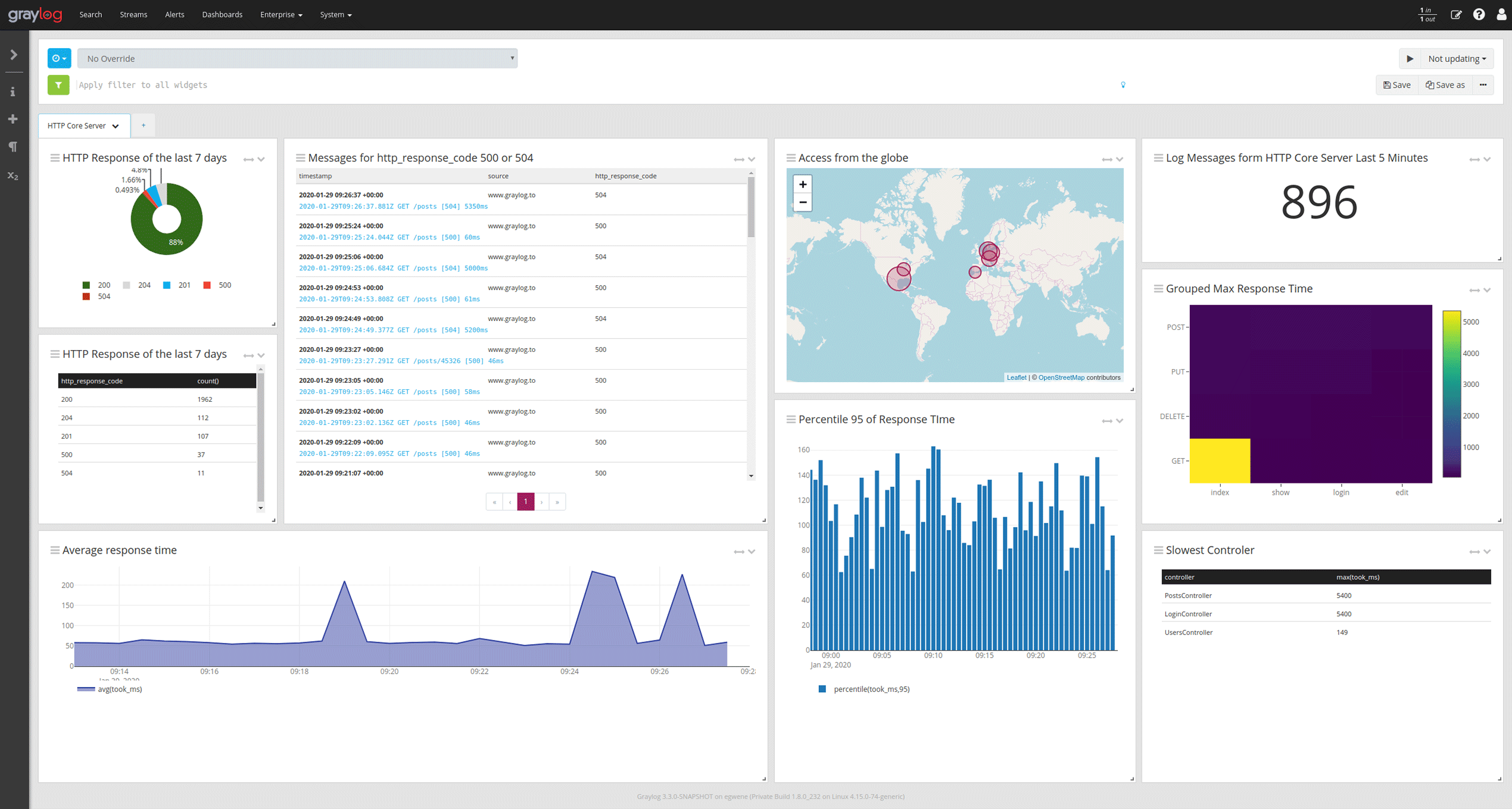
Navigate quickly and easily through the clearly laid out interface.
Visualize your collected log information in various graphical views.
Use a simple query language to quickly filter for fields and content.
Quickly define individual time periods in which data is displayed and activate automatic updating.
Display your log information as a table so that you can quickly access all information for this log type.
Use location data in your login information to quickly display it on a map.
Calculate numerical data such as the average response times of a web server based on the data in the logs.
Start small, make clear progress
You don’t have to start a big project right away. Choose the entry point that suits your situation – each step provides you with a concrete result.
Graylog Review
Are you already using Graylog? We'll look at it together and show you where it's stuck.- Analysis of your existing installation & architecture
- Testing performance, scaling and configuration
- Check your inputs, streams and pipelines
- Concrete, prioritized recommendations for action
- Joint discussion of the results with your team
- Our approach: In a joint day with you, we discuss the open issues, work out our recommendations and finally present the results to you.
- Your result: A clear to-do list that lets you know exactly where things are stuck and what needs to be done next.
Strategy workshop
Together we will clarify which data you want to analyze and the best way to do this.- Recording your requirements, goals and framework conditions
- Evaluation of your current log and security landscape
- Architecture recommendation suitable for your environment (sizing, backend, scaling)
- Tooling recommendation (Graylog & useful additions)
- Concrete implementation roadmap with next steps
- Our approach: In a joint day with you, we discuss the open topics, create the roadmap for your environment and then present the results to you in detail.
- Your result: a resilient plan that your team can use to tackle implementation immediately and without detours.
Proof of concept
We set up an initial executable search and log environment with you - for you to touch.- Set up a test environment with real log sources from your systems
- Setting up initial streams & dashboards for an overview
- Configuration of functioning alarms and pipelines
- Connection of an exemplary log source
- Knowledge transfer and training of your team on the environment
- Our approach: In a joint day with you, we discuss the open topics, create a PoC (in cooperation with you) and finally present the result to you.
- Your result: A functioning demo environment as a tangible basis for the decision and the subsequent real system.
Graylog Training
Learn log management with Graylog for centralized processing and analysis of logs
The Graylog training provides valuable knowledge about the installation and configuration of all platform components for collecting and processing log data, as well as their scaling. The aim of the training is to provide you with the knowledge you need to get started with your own Graylog installation.
Questions & Answers
The most frequently asked questions about Graylog
How does Graylog work?
Graylog is a log management tool that collects, stores and analyzes centralized logs from various sources such as servers, networks and applications. It allows this log data to be searched, filtered and visualized in real time, which makes troubleshooting and monitoring systems much easier. In addition, Graylog offers alarm functions to send notifications immediately in the event of certain events or anomalies.
What is a Graylog server?
A Graylog server is the central component of the Graylog log management system, which collects, processes and stores log data from various sources. It uses OpenSearch for indexing and MongoDB for storing configuration data, while providing the user interface for analysis and visualization. The Graylog server makes it possible to search through log data in real time and create alerts and dashboards to monitor the status and security of systems.
What can Graylog do?
Graylog can collect log data from various sources such as servers, networks and applications, store it centrally and search it in real time. It offers powerful search and filter functions to quickly identify anomalies or problems in large amounts of data. Graylog also enables the creation of dashboards and alarms to monitor systems and receive immediate notifications in the event of critical events.
Is Graylog open source?
Yes, Graylog is open source and offers a freely available version that covers the core functions such as log collection, analysis and visualization. The open source version allows users to host and customize Graylog themselves. In addition, there is a commercial enterprise version with extended functions such as advanced alerts, user management and support, which is specially tailored to larger organizations.
Which versions of Graylog are available?
Graylog offers two main versions: the free open source version and the paid enterprise version. The open source version includes all core functions such as log recording, analysis and dashboard creation, while the enterprise version offers advanced features such as archiving, extended user and role management and better support. There is also Graylog Cloud, a hosted version that offers similar functions to the Enterprise version, but without the need for a dedicated infrastructure.
What can I use Graylog for?
Graylog can be used to centrally collect and analyze log data, which is particularly useful for monitoring servers, networks and applications. It facilitates troubleshooting, the detection of security incidents and the tracking of operating processes thanks to its powerful search and filter functions. Graylog also helps to monitor system metrics in real time and trigger alarms when unusual events or thresholds are exceeded.
