

Wazuh Consulting
Security · SIEM & XDR
Do you need a SIEM that works reliably day in and day out? Through our Wazuh consulting services, we’ll build the platform together with you. So you can monitor your infrastructure, detect security incidents, and respond to threats in real time.


Does this sound familiar to you?

The audit is coming up
An auditor or an internal policy requires centralized security monitoring. We need a SIEM, but we don’t have the budget for expensive licenses for proprietary solutions.

Changes happen without anyone noticing
On critical servers, configurations and files change without anyone noticing. If an incident occurs, it is no longer possible to determine who made what changes and when.

The area is growing
New locations, more servers, more clients. Without centralized monitoring, no one knows which systems have been hardened and where security vulnerabilities remain.
What Wazuh Can Do
Wazuh combines attack detection, file integrity, vulnerability scans, and configuration checks into a single platform.

Detecting Threats Early
Wazuh analyzes logs, system events, and network activity in real time and compares them against detection rules. Suspicious patterns, such as brute-force attacks or unusual processes, are detected before they can cause any damage.

Spot Manipulation Immediately
File Integrity Monitoring monitors critical files and directories. You can see which file was changed, when, and by whom. This helps with clarification and serves as evidence during the audit.
Demonstrate compliance
Wazuh continuously checks your systems against hardening guidelines such as the CIS benchmarks and centrally logs security-related events. This provides you with documentation for ISO 27001 audits or GDPR requirements without having to manually gather it each time.

Keeping an Eye on Vulnerabilities and Configuration
The agent detects installed software with known vulnerabilities and highlights deviations from your target configuration. This way, you can see at a glance where SSH root login is still active or which package urgently needs an update.

Fewer Alarms, Faster Response
With carefully configured rules, Wazuh reports only what is truly relevant. Recurring actions, such as blocking an IP address after an attack, can be automated using Active Response.
Your data stays with you
Wazuh runs entirely on your own infrastructure, with no licensing costs and without security data ever leaving an external cloud service.
Why set up Wazuh with NETWAYS?
We have been operating open-source infrastructures for over 30 years. At Wazuh Consulting, our consultants don’t just set up the platform—they also explain to your team how it works. This creates a SIEM that you can continue to develop on your own.
This is what Wazuh looks like in everyday life
Wazuh Web Interface
The dashboard consolidates all modules in one place: security events, vulnerabilities, configuration checks, and file integrity.
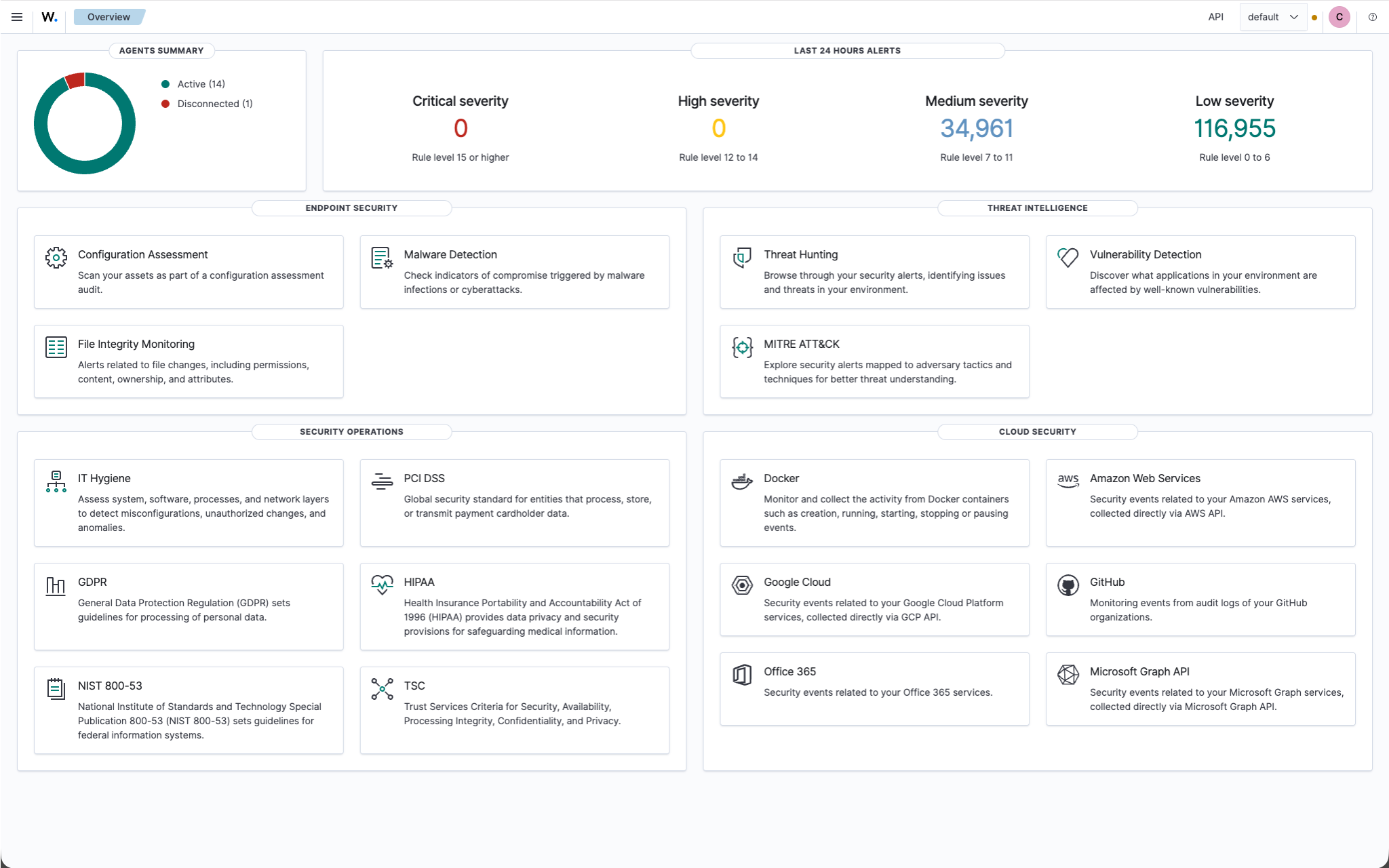
The “Configuration Assessment” feature regularly checks systems against predefined guidelines (e.g., CIS benchmarks) for hardening and security configuration weaknesses and reports which checks were passed or failed.
The “File Integrity Monitoring” feature monitors specified files and directories for changes (creation, modification, deletion) and reports when and by whom the contents, permissions, or attributes have been changed.
Wazuh Configuration Assessment
The Configuration Assessment regularly checks systems against predefined guidelines (e.g., CIS benchmarks) for hardening and security configuration weaknesses and reports which checks were passed or failed.
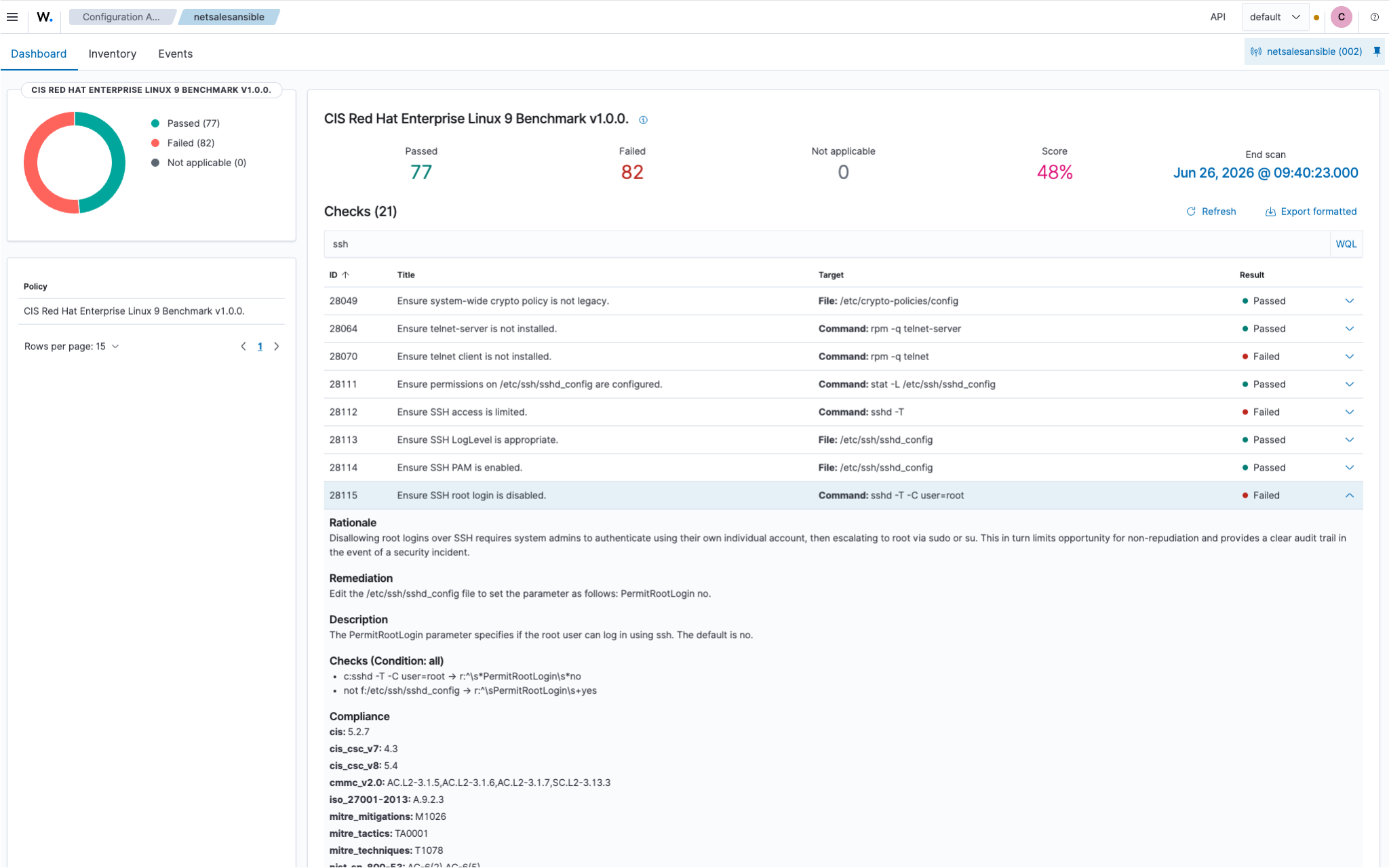
This row shows the details of a single failed test. On this system, root login via SSH is currently not disabled.
Here’s How Your Wazuh Consultation Works
Four steps to a Wazuh setup that works in production.

Analysis & Concept
We'll review your infrastructure and security requirements and work with you to determine which systems should be monitored and which compliance requirements need to be addressed. From our experience with hundreds of projects, we know the pitfalls. This is how you avoid blind spots and false alarms that obscure real incidents.

Setup & Integration
We deploy Wazuh agents and configure servers, rules, decoders, and the dashboard to perfectly suit your teams and systems. A well-thought-out design will save you from costly modifications down the road. From the very beginning, we've focused on a structure that grows along with your environment.

Commissioning & Alarms
During the first few weeks, it becomes clear which alarms are genuine alerts and which are just noise. We'll fine-tune the rules until Wazuh only flags items that someone needs to review, and we'll forward the alerts to the appropriate people.

Support & Operations
Upon request, we can take over day-to-day operations entirely (outsourcing) or assist your team with support and training. Updates, rule maintenance, and availability take up a lot of time internally. We keep your security platform running smoothly so you can focus on your core business.
Pricing for Your Wazuh Consultation
Three ways to join Wazuh Consulting. Each package concludes with a concrete result that your team can use to continue working right away.
Wazuh Review
Are you already running Wazuh? We'll take a look at it together and show you where the problem lies.- Analysis of Your Existing Installation & Architecture
- Testing Performance, Scalability, and Agent Distribution
- Check your detection rules and alert settings
- Specific, prioritized recommendations for action
- Discuss the results with your team
- Our Approach: We’ll spend a day working with you to discuss the outstanding issues, develop our recommendations, and finally present the results to you.
- Your result: A clear to-do list that lets you know exactly where the problem lies and what to do next.
Strategy Workshop
Together, we'll figure out what you want to insure and what the best way to do that is.- Gathering your requirements, goals, and compliance requirements
- Assessment of Your Current Security and Logging Environment
- Architecture recommendations tailored to your environment (sizing, indexers, scaling)
- Tooling Recommendations (Wazuh & Useful Additions)
- A concrete implementation roadmap with next steps
- Our Approach: During a full day spent with you, we’ll discuss the outstanding issues, create a roadmap for your organization, and conclude by presenting the results to you in detail.
- Your result: A solid plan that your team can use to get started right away, without any detours.
Proof of Concept
We'll work with you to set up your first functional security environment—one you can actually use.- Setting up a test environment with real agents from your systems
- Setting Up the First Dashboards & Detection Rules
- Configuring Functional Alerts & Responses
- File Integrity Monitoring for a Sample System
- Knowledge transfer and training for your team on the environment
- Our Approach: During a day-long session with you, we’ll discuss the outstanding issues, create a proof of concept (in collaboration with you), and finally present the results to you.
- Your result: A fully functional demo environment that serves as a tangible basis for decision-making and the eventual production system.
Expertise on Wazuh
Want to dive deeper? You might be interested in these blog posts about Wazuh.
What can Wazuh do?
Last updated: August 13, 2026 · Reading time: 7–9 minutes What exactly can Wazuh do? In this article, Leander explains how the open-source security platform processes events, what modules it includes, and how these elements come together in typical everyday scenarios....
What is Wazuh?
Last updated: July 2, 2026 · Reading time: 3–4 minutes Wazuh is an open-source security platform that combines log management, intrusion detection, vulnerability assessment, and compliance monitoring all in one place. At NETWAYS, we’re getting more and more questions...
Frequently Asked Questions About Wazuh
What is Wazuh?
Wazuh is an open-source security platform that combines SIEM and XDR. Agents on servers, clients, and VMs collect security data that is analyzed centrally for attack detection, vulnerability scans, configuration checks, and file integrity. You can read more about this in our article What is Wazuh?
How much does a Wazuh consultation cost at NETWAYS?
A Wazuh consultation at NETWAYS starts at €2,000 for a review of your existing installation. We also offer a strategy workshop (€4,000) and a proof of concept with real agents from your area (€8,000) at a fixed price, plus VAT. Wazuh itself is free. We quote larger projects on a time-and-materials basis once we know your requirements.
Wazuh is free, after all. Why do I need counseling?
The license is free, but operating the system isn't: sizing, deploying agents, configuring rules and decoders, updates, and filtering out false alarms. Without experience, this often takes months. With a Wazuh consultation, the platform will be up and running faster. And because we work directly within your environment as part of our consulting services, your team learns how to manage it on their own.
Do you also offer Wazuh support?
Yes, we also provide Wazuh support after your consultation. Our team is here to help you with any questions you may have about rules, updates, and error messages in your environment. If you want to hand over operations entirely, we'll take them over as part of our outsourcing services.
Can I run Wazuh on my own afterward?
Yes, that's the goal in most projects. We set up Wazuh in a way that makes it easy for your team to understand the configuration, and we explain rules, updates, and common error scenarios directly in your environment. If you need assistance later on, our support team will be happy to help.
Why am I getting so many alerts from Wazuh?
Wazuh's default rules are intentionally broad. Unless you configure Wazuh to match your environment, it will also report harmless events, such as scheduled maintenance or known services. The solution is rule tuning: adjust rules, define exceptions, and set appropriate alarm levels. That's exactly what we're looking at in the Wazuh Review.
Does Wazuh help with an ISO 27001 audit?
Wazuh provides much of the evidence that auditors want to see: centrally collected security events, logs of file changes, and regular checks against hardening policies. Wazuh alone does not make you eligible for certification, but it does make it much easier to document compliance. We'll clarify the specific requirements of your audit during the strategy workshop.
Wazuh or Elastic Security: Which Is a Better Fit?
Wazuh excels at monitoring endpoints: vulnerabilities, configuration, and file integrity. Elastic Security really shines when it comes to large volumes of data and flexible log analysis. Both can also be combined. We support both platforms and will recommend the one that's best suited to your environment.
What is the Wazuh Agent, and what does it do?
The Wazuh Agent is a lightweight piece of software that you install on servers, workstations, or virtual machines. It collects security-related data such as system logs, file changes, running processes, and installed software, and sends it to the Wazuh server. There, the data is analyzed to detect attacks, vulnerabilities, and configuration discrepancies. The agent runs on Linux, Windows, and macOS, and can also take action on its own when instructed by the server—for example, by blocking a suspicious IP address.
How do I install the Wazuh Agent?
To install the Wazuh agent, first download the installation script or package for your operating system from the official Wazuh website, or use your system's package manager (e.g., `apt` for Ubuntu). After installation, configure the agent file (`ossec.conf`) to establish a connection to the Wazuh server by specifying the server's IP address and other relevant parameters. Finally, start the agent using the command `sudo systemctl start wazuh-agent` and register it with the Wazuh server to enable data transmission.
