

Ansible
Modern management and configuration of your systems
With Ansible you can automate your IT – via command line or graphically. The open source platform combines both and is ideal for configuration and software provision under Unix, Linux and Windows.

From the idea to the running Ansible stack
You don’t have to build Ansible alone. We accompany you step by step – and stay by your side afterwards.

Analysis & Concept

Setup & Integration

Commissioning & automation

Support & Operations
Ansible Features
No more manual work on every server: Ansible automates your IT in simple YAML files – repeatable, traceable and consistent across the entire infrastructure.

Agentless automation

Automatic compliance

Simple provisioning

Reusable rolls

Cross-platform

Overview via web interface
ANSIBLE web interface
The screenshot shows an overview of Ansible Tower, in which the various components and functions of the dashboard are clearly explained.
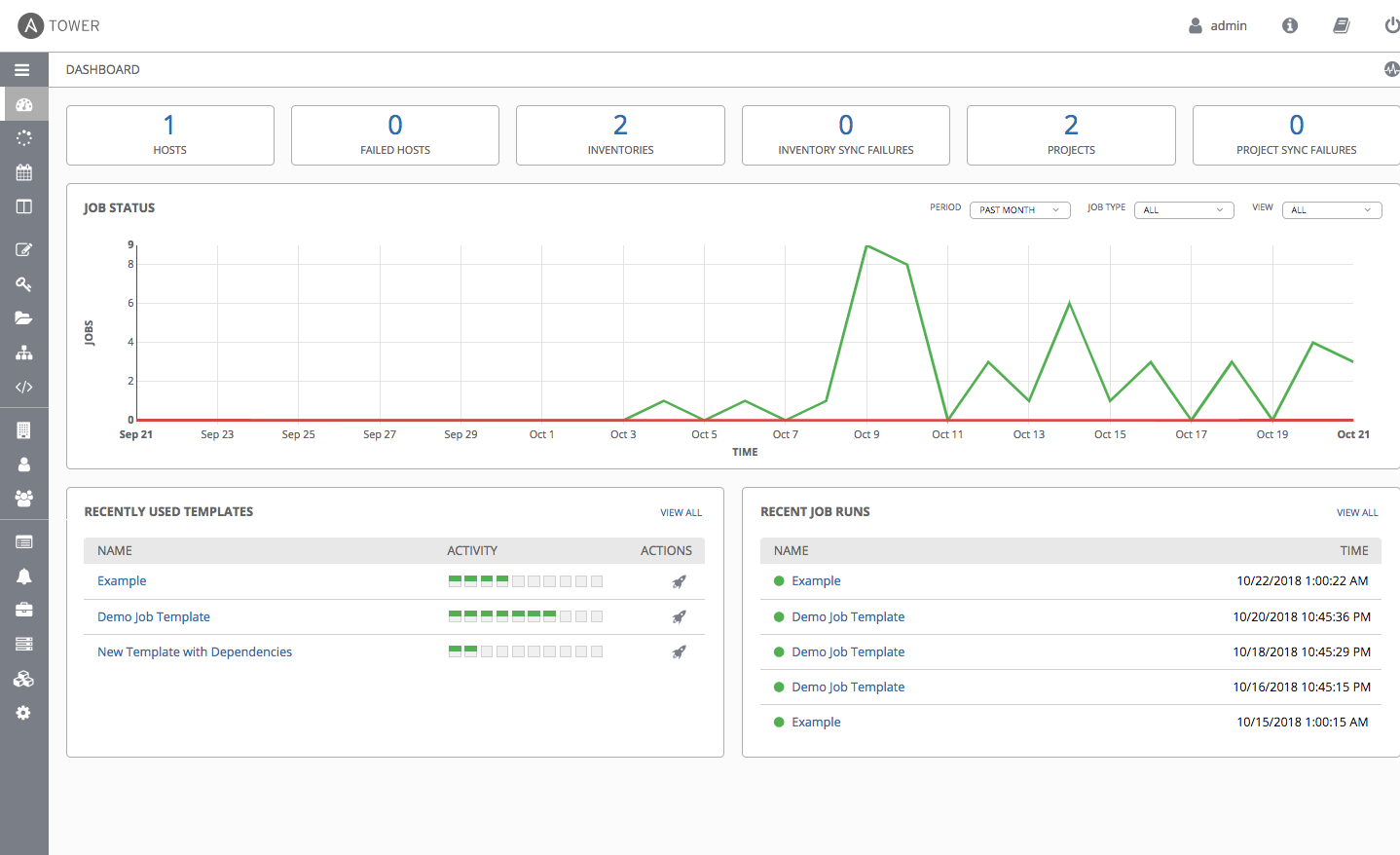
Get a quick overview of all your systems and the respective status of executed jobs.
A graphical overview quickly shows how many jobs have run in a specific time interval and whether errors have occurred.
Ansible-Tower works with templates to simplify configuration. Get a quick overview of which templates were last used in the dashboard.
Get a quick overview of which jobs were recently run and whether they were successful.
Manage users in Ansible Tower and manage different roles and rights.
Shaping IT together
We help you to strategically plan, technically implement and sustainably operate modern IT and monitoring solutions. We combine consulting, implementation and support to create a tailor-made service that is geared to your requirements. Our aim is to make complex systems transparent, stable and efficient to use.
Ansible Training Courses
Learn to automate and manage complex IT infrastructures efficiently with Ansible
Ansible for Beginners
In this Ansible training course for beginners, we teach you the basics of Ansible. You will learn how to install and configure Ansible. The course also covers the many sources of variables and how Ansible uses them, the configuration of Linux/Unix systems and the importance of inventories, including an insight into Dynamic Inventories.
Ansible for Advanced Users
In this course, we will expand your Ansible skills and make you a high-flyer. You will practise creating a Python module, learn about advanced templating and how to develop Jinja2 filters yourself in Python.
Expertise in Ansible
Want to dig deeper? You might find these blog posts about Ansible interesting.
Ansible Loop: Basics and Looping Across Multiple Tasks
Last updated: October 1, 2026 · Reading time: 4–6 minutes With an Ansible loop, you can run a task for each item in a list.…
Ansible: What to Do with Standalone Roles?
Last updated: September 3, 2026 · Reading time: 9–11 minutes Ansible has been using so-called ” Collections” since 2019. They are the primary method for…
Ansible and the Elastic Stack
Last updated: August 6, 2026 · Reading time: 4–6 minutes In this article, I’d like to introduce you to the Ansible Collection netways.elasticstack, which allows…
Ansible Icinga Collection
Last updated: July 16, 2026 · Reading time: 4–6 minutes With Ansible and Icinga, you can automate the setup of your entire monitoring environment. The…
Ansible basics
Last updated: 28.05.2026 Imagine you have to install the same packages, start services and adjust configurations on 10 servers. Manually via SSH, with copy-paste commands…
Infrastructure as Code (IaC): Fundamentals, History, and Practical Applications of Ansible and GitLab
Introduction The way in which IT infrastructure is provided and operated has changed significantly in recent decades. In the early years of system administration, everyday…
Data collection with the Support Collector
Last updated: July 27, 2026 · Reading time: 5–7 minutes What is the Support Collector and how does it work? The Support Collector offers an…
Questions & Answers
The most frequently asked questions about Ansible
What can you do with Ansible?
Ansible can be used to automate IT infrastructures by simplifying tasks such as configuration management, software deployment and orchestration of services. It enables the management of servers, networks and applications across different platforms without the need for special agent software. You can also create complex workflows to carry out recurring tasks efficiently and consistently.
What is an Ansible Playbook?
An Ansible Playbook is a YAML file that contains instructions for automating IT tasks. It describes step by step which configurations or actions are to be executed on target systems. Playbooks make it possible to control complex processes such as software installations, configuration changes or deployments across different hosts in a simple and repeatable way.
What is Ansible simply explained?
Ansible is a tool that can be used to automate computers and servers so that they perform certain tasks automatically. It uses simple text files to define what is to be done, such as installing programs or changing settings. This saves time and errors, as you don't have to do everything manually.
What does Ansible cost?
Ansible is open source, freely available and can be used free of charge. If you need our help with the introduction or operation of Ansible, there are costs for our services. Simply ask us about our services and we will be happy to explain the possible costs to you.
What is an Ansible script?
An Ansible script, usually referred to as a "playbook", is a text file that contains instructions in YAML format to automate certain tasks on servers. It describes which actions Ansible should perform on the target systems, such as installations or configuration changes. These scripts make it possible to carry out complex processes in a repeatable and efficient manner.
Which systems does Ansible support?
Ansible supports a wide range of operating systems, including Linux distributions such as Ubuntu, CentOS and Debian as well as Unix-based systems such as macOS. Windows can also be managed automatically with special modules and customizations. Ansible is also compatible with network devices, containers and cloud services such as AWS, Azure and Google Cloud.
