

GitLab
The platform for the entire life cycle of your software development

Accelerate your development process
With GitLab, we offer you a version control and collaboration platform with which you can efficiently manage and automate your code projects. You can use it to host your Git repository, set up CI/CD pipelines and optimize team collaboration to develop software faster and more securely.
Gitlab Features

Git repository management
With GitLab, you can manage and version your code repositories centrally. You have the option of creating different branches, managing pull requests and tracking code changes. This means you always have an overview of the development status and history of your project.
CI/CD pipelines
You can set up automated CI/CD pipelines in GitLab to continuously test, integrate and deploy your software. Automated builds and tests ensure that code changes are checked directly before they go into production. This improves the quality of your code and speeds up the development process.

Collaboration and code review
GitLab offers you integrated tools for code reviews and team collaboration. You can create merge requests, give feedback and hold discussions directly on the code. This promotes structured collaboration and helps to identify errors at an early stage.
Gitlab web interface
The screenshot shows an overview of the GitLab web interface, in which the various components and functions of the dashboard are clearly explained.
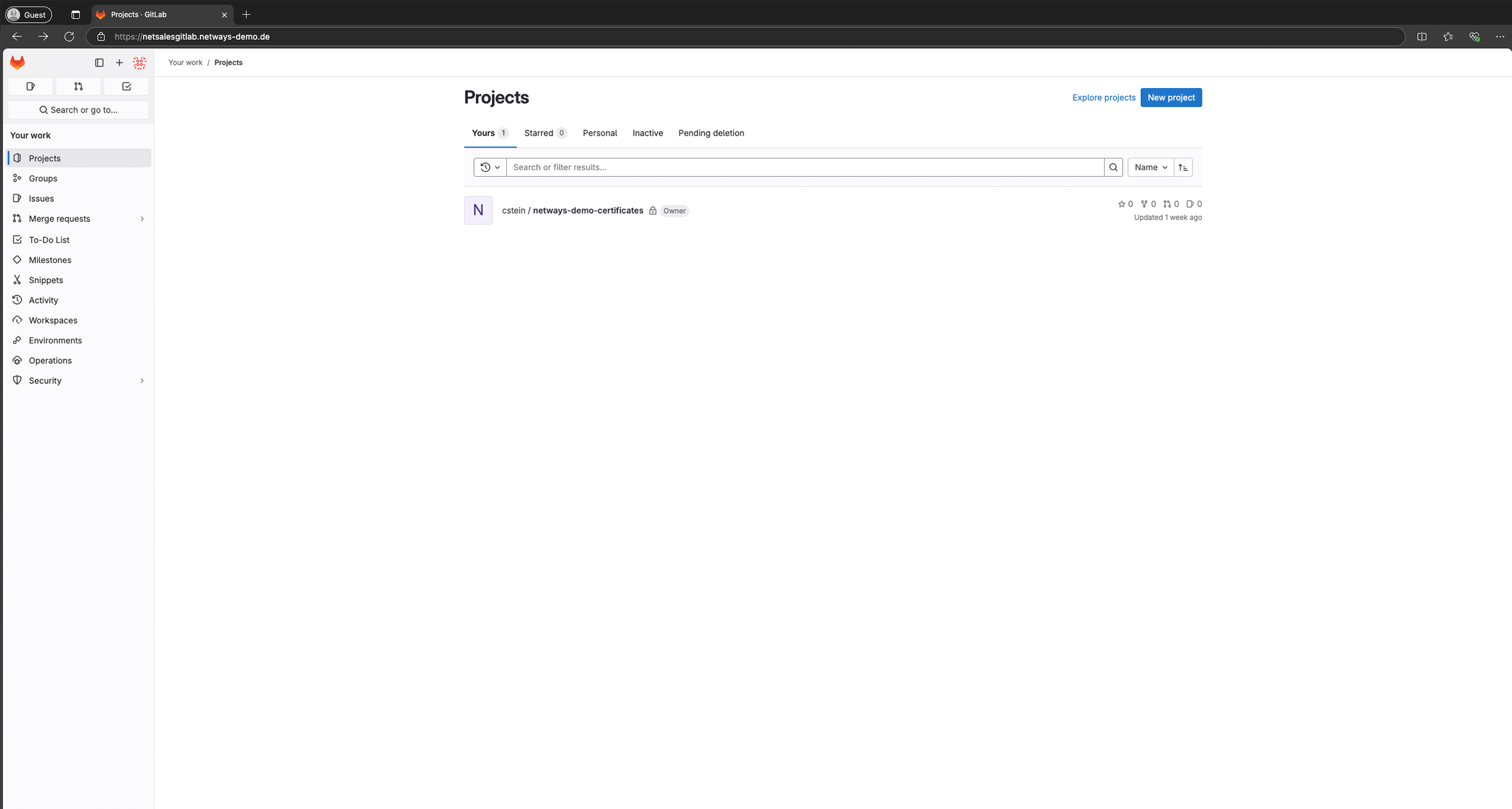
Manage all your projects in one interface.
Navigate quickly through the menu to reach the most important elements.
Use individual accounts for granular authorization management.
Add new projects quickly so you can start working straight away.
GitLab Consulting
We help you with the design, installation and integration of GitLab in your environment – for more power, know-how and peace of mind!
Power
We have been successfully supporting our customers in the operation of their IT infrastructures for many years. Whether it’s different industries, tools or operating systems – we’ve seen, operated and built it all. With extensive experience in best practices around Grafana, Prometheus, InfluxDB and other open source technologies, especially in the Linux environment, we are at your side with our know-how.
Know-how
We not only understand your IT systems and services, but also the big picture – the numerous aspects that make up the operation of complex IT infrastructures. In a world where IT is becoming increasingly complex and constantly changing, there is often a lack of time and personnel. This is exactly where we come in to provide you with optimum support.
Targeted reinforcement
As Linux generalists and open source experts, we are broadly positioned and deeply networked in the open source communities. With us by your side, you are never alone! Whether as an IT consultant, engineer, support or architect – we strengthen your team, relieve you and take over the work so that you can concentrate on the essentials.
GitLab Training
Discover the all-in-one solution for version control and DevOps collaboration
In this GitLab training course, participants will gain a sound insight into the basics of Git, its configuration and the use of shell and GUI clients. They will also learn how to use GitLab, from repositories, issues and releases to conflict resolution in various branches.
Managed GitLab
Accelerate your development processes in the blink of an eye
Managed GitLab allows you to concentrate fully on your core business. This allows you to develop and deploy your software faster and more efficiently. We take over the entire operation of your Managed GitLab and take the pressure off your IT. Our hosting is fully GDPR-compliant and takes place exclusively in Germany – updates included!

Know-how
More know-how about GitLab

Infrastructure as Code (IaC): Grundlagen, Geschichte und Praxis mit Ansible und GitLab
Introduction The way in which IT infrastructure is provided and operated has changed significantly in recent decades. In the early years of system administration, everyday…

Observability vs Monitoring
The term observability is on everyone’s lips and is often touted as a modern solution to dusty old, static monitoring. All manufacturers offer it, all…

Icinga Web Module for Performance Data Graphs
After we forked the Grafana module for Icinga Web last year, we thought about whether there are other ways to graphically display Icinga performance data…

The Icinga Web Grafana module has found a new home
We are happy to announce that the Icinga Web Grafana module has found a new home! Originally developed by Carsten (Mikesch-mp), this module is a…

Katello as a package mirror for Icinga
This article is about setting up Katello as a package mirror for Icinga. Specifically, Icinga for Windows, Debian / Ubuntu, Red Hat Enterprise Linux and…

NIS 2 – The current status in January 2025
Since its adoption, the EU Directive NIS 2 (Network and Information Security Directive 2) has been a central element of the European cyber security strategy.…

Show users in MySQL
In MySQL, user management plays a crucial role in making database access secure and efficient. But how do you display existing users? In this blog…

Icinga 2 Security Release – November 2024
Critical error in the Icinga 2 core Today, November 12, 2024, the Icinga team has released a security fix that is classified as CRITICAL. The…
Data collection with the Support Collector
Last updated: 22.11.2024 What is the Support Collector and how does it work? The Support Collector offers an easy way to automatically record all important…
Questions & Answers
The most frequently asked questions about GitLab
What do you do with GitLab?
GitLab is used to manage source code in repositories, perform version control and enable collaboration in software projects. It provides CI/CD pipelines to perform automated builds, tests and deployments, which accelerates software development and delivery. In addition, GitLab provides tools for code reviews, issue tracking and project management to make the entire development process more efficient.
Is GitLab free of charge?
GitLab offers a free version known as "GitLab Free" and includes many core features such as version control, CI/CD and basic project management. However, there are also paid plans such as "Premium" and "Ultimate", which offer additional features such as extended support, advanced security tools and advanced management functions. For private, self-hosted installations, the free GitLab Community Edition is available, which also covers many basic functions.
How much does GitLab cost?
GitLab offers a free version called "GitLab Free", which covers basic functions such as Git repository management, CI/CD and project management. There are paid plans for extended functions: "GitLab Premium" and "GitLab Ultimate". These plans include additional security and compliance tools. Prices can vary depending on requirements and company size, and there are special offers for educational institutions and open source projects. Simply contact us and we will find the right model for you.
What is GitLab simply explained?
GitLab is a platform that allows developers to save, share and collaborate on their code. It helps to track changes to the code, carry out automated tests and deployments and organize projects. This enables teams to work together efficiently and develop their software faster and more securely.
What is a GitLab server?
A GitLab server is an instance of GitLab that is hosted on a dedicated server or in the cloud and enables developers to manage their projects and repositories centrally. It offers the infrastructure to provide GitLab functions such as version control, CI/CD and project management. The dedicated hosting option gives you full control over data, security and system configuration.
What is the difference between Git and GitLab?
Git is a distributed version control system that makes it possible to track and manage changes to code locally without having to rely on a central server. GitLab, on the other hand, is a platform that hosts Git repositories and provides additional functions such as project management, CI/CD pipelines and code review tools. While Git is used for the local management of source code, GitLab extends this functionality through central collaboration and automation in software projects.
How do you work with GitLab?
To work with GitLab, you first create a repository in which the source code is stored and use Git to track changes locally and upload them to the GitLab repository. Teams can work together on projects by creating branches for different functions or bug fixes and checking and merging the code via merge requests. In addition, CI/CD pipelines can be set up to execute automated tests and deployments directly after each commit.
Who is behind GitLab?
GitLab was originally developed by Dmitriy Zaporozhets and Valery Sizov from Ukraine and published as an open source project in 2011. The company GitLab Inc. was later co-founded by Sid Sijbrandij and is now a global company with a fully distributed team. GitLab has developed into one of the leading DevOps platforms and is used by an active open source community and many well-known companies worldwide.
Who owns GitLab?
GitLab is owned by GitLab Inc., which was co-founded by Sid Sijbrandij and has been listed on the US stock exchange NASDAQ since 2021. Although Sid Sijbrandij has a significant role and involvement as CEO, investors and shareholders also own shares in the company. As a result of the IPO, GitLab is now a public company supported by a large number of institutional and private investors.