



Last updated: October 22, 2026 · Reading time: 9–13 minutes
What is OpenTelemetry? In short: the open, vendor-neutral standard for collecting, processing, and sending metrics, logs, and traces to a backend of your choice.
Anyone who deals with monitoring or observability will sooner or later (more likely sooner) come across OpenTelemetry. This is a topic on which there are often differing views and opinions as to what it really entails. In this article, I’ll try to provide an overview of the topic.
The most important points in 30 seconds
- OpenTelemetry (OTel) is a vendor-neutral, open-source framework for collecting, processing, and exporting telemetry data, and has since become the de facto industry standard.
- OTel is neither a backend nor a visualization system. The data is sent via OTLP (gRPC or HTTP) to a compatible backend such as VictoriaMetrics, Grafana LGTM, Elasticsearch, or OpenSearch.
- Metrics show that something is wrong; traces show where it’s happening; and, ideally, logs show why.
- The OpenTelemetry Collector uses pipelines consisting of receivers, processors, and exporters, supplemented by extensions and connectors.
- Semantic conventions ensure consistent attribute names, such as
host.name, and make data from different sources directly comparable.
What exactly is OpenTelemetry?
OpenTelemetry (OTel) is an open-source, vendor-neutral framework and toolkit for collecting, processing, and exporting telemetry data such as logs, traces, metrics, and profiles. It has now become the de facto industry standard for the use cases mentioned (Profiles is currently still in the “development stage”).
OTel offers SDKs, APIs (for all common programming languages), and various tools to generate telemetry data from applications and make it available in a standardized data format. The OpenTelemetry Protocol (OTLP) is used to transmit this telemetry data, implemented via the gRPC and HTTP transport protocols.
Since misunderstandings keep cropping up: OpenTelemetry is not a backend or visualization system.
Here is an example of how OpenTelemetry can be used, using the OTel Collector as an example.
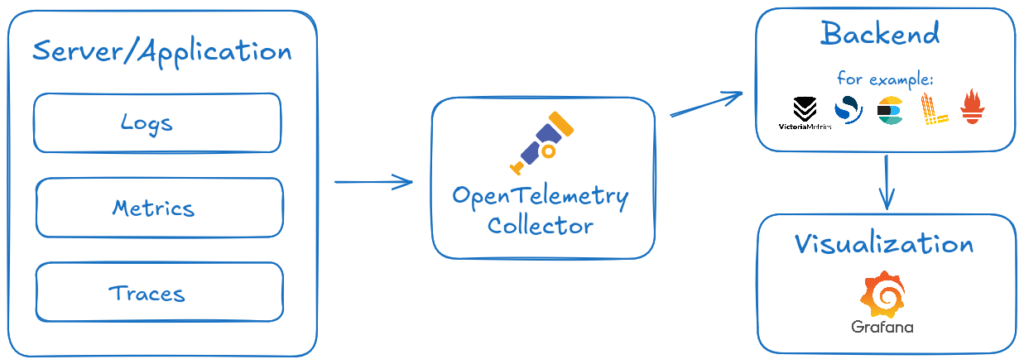
OpenTelemetry is a Cloud Native Computing Foundation (CNCF) project. The project aims to establish a uniform standard for the instrumentation of applications as well as for the collection and transmission of telemetry data.
What exactly is telemetry data?
Telemetry data is required to monitor systems and applications. This data is made available to us through various channels or can be retrieved. It is important to note that this data does not simply appear out of thin air; it must be made available by the application or the system.
Before we start collecting data, we should first determine exactly what we want to monitor or observe. To start with, here is a brief overview of the three most common types of data signals that can be collected, and what they entail:
| Signal | Property | Purpose |
|---|---|---|
| Metric | Numerical measurements recorded at a specific point in time. | How much, how often, etc.? |
| Log | Text-based entries that describe an event within a system, along with a timestamp indicating when it occurred. | What happened? |
| Trace | A record of the entire path that a request takes through a distributed system—broken down into individual steps, known as “spans.” | Where did it happen? |
Metrics
Metrics tell us that something is wrong with our system, but not why. Metrics are measured using so-called measuring instruments; the type of instrument determines how the measurement is taken. Here is a brief explanation of the most common types:
| Type | Description |
|---|---|
| Counter | Counts only upward, e.g., the total number of HTTP requests received. |
| Gauge | Measures a current value at the time of the query, such as the current CPU utilization. |
| Histogram | Aggregates measurement values on the client side, for example, to analyze the distribution of response times. |
Traces
If a metric—for example, high latency for our web service—is displayed, we know that the service isn’t working as intended, but we don’t yet know why. This is where traces come in handy: They show us where latency occurs as data travels through multiple services (databases, APIs, frontend, etc.).
To do this, it traces each request from its starting point to the final response, recording the time required for each service along the way.
A trace is divided into smaller units called ” spans.” Each span represents an operation: HTTP request handling, database query, calling another service, etc. The representation is organized hierarchically; a parent span can contain multiple child spans.
Logs
Ideally, logs show us why something isn’t working. A log entry records a specific event at a specific time.
How do I collect and process telemetry data using OpenTelemetry?
In the next step, we would like to collect the specified telemetry data and send it to any backend (VictoriaMetrics, Grafana LGTM, Elasticsearch, OpenSearch, etc.). To do this, we use the OpenTelemetry Collector (otelcol).
Install the OpenTelemetry Collector
otelcol can be installed in several ways:
- Source
- Docker
- Kubernetes
- Binaries (Linux, macOS, Windows)
Installation on a Debian system, as shown in the example, is quick and easy because DEB packages are available. When the package is installed, a systemd service is created at the same time.
The Collector is available in two versions: the Standard version and the Contrib version. The Standard edition includes only a few common receivers, exporters, extensions, processors, connectors, and providers (more on this below), while the Contrib edition already includes all available ones. In principle, individual modules can also be integrated; however, to make things easier for us, we’ll choose the “Contrib” option in our example.
sudo apt-get update
sudo apt-get -y install wget
wget https://github.com/open-telemetry/opentelemetry-collector-releases/releases/download/v0.158.0/otelcol-contrib_0.158.0_linux_amd64.deb
sudo dpkg -i otelcol-contrib_0.158.0_linux_amd64.debAfter installation, you can begin configuring the collector; the configuration file is located at:
/etc/otelcol-contribStructure of the Collector Configuration
The configuration file can consist of the following pipeline components:
| Component | Purpose |
|---|---|
| Receivers | Collecting telemetry data from various sources and in various formats |
| Processors | Transforming, filtering, or supplementing telemetry data |
| Exporters | Sending Telemetry Data to a Backend |
| Connectors | Used to connect two pipelines; acts as both an exporter and a receiver |
| Extensions | Provides additional features, such as authentication |
Below, we provide an example configuration for sending metrics and log files from a Linux system to a VictoriaMetrics/VictoriaLogs backend using vmauth for authentication.
By default, the file is located at /etc/otelcol-contrib/config.yaml
Receivers
We’ll start with the receiver block for our host system’s telemetry data. This section defines what we want to collect and from which source. Using Hostmetrics as an example, there are predefined standard metrics provided for each scraper (CPU, disk, etc.). In addition, there are various optional metrics, which must be explicitly defined. You can find out what they are by clicking on the following link. You can find more receivers here.
---
receivers:
  hostmetrics:
    root_path: /hostfs
    collection_interval: 10s
    scrapers:
      cpu:
        metrics:
          system.cpu.utilization:
            enabled: true
          system.cpu.logical.count:
            enabled: true
      disk:
      load:
      filesystem:
        exclude_mount_points:
          match_type: regexp
          mount_points:
            - '/hostfs/proc.*'
            - '/hostfs/sys.*'
      memory:
        metrics:
          system.memory.utilization:
            enabled: true
          system.memory.limit:
            enabled: true
      network:
      paging:
        metrics:
          system.paging.usage:
            enabled: true
      processes:
      process:
        mute_process_exe_error: true
        mute_process_io_error: true
        mute_process_user_error: true
      system:
        metrics:
          system.uptime:
enabled: trueNext, we’ll focus on the receiver for our log files, which we retrieve from the host system’s journal. Here, too, there are various configuration parameters. For example, we can configure which systemd units we’re interested in; after all, it doesn’t necessarily make sense to include the entire Journald in our backend.
It’s also important to note that the otelcol-contrib package requires read access to the journald.
journald:
   directory: /var/log/journal
   priority: info
start_at: endProcessors: Resource Detection
Now that we’ve defined which telemetry data we want to receive and process, the next step involves the processors. Here, we could add additional attributes to the telemetry data, such as labels, etc. You can find more information about this here. In our simple example, we use only the Resource Detection Processor.
The Resource Detection Processor detects the metadata of our host system and “converts” this information into the OpenTelemetry Resource Semantic Conventions. You’ll find out why this is good and important in the next paragraph.
processors:
 resourcedetection:
   detectors: [system]
   system:
hostname_sources: ["os", "dns"]Extensions and Exporters
With that, we have defined everything related to telemetry. As the second-to-last step, we’ll define the extensions and exporters.
Extensions are optional components that are not directly related to the processing of telemetry data; in our example, we use Basicauth to authenticate ourselves on the backend. You can find additional extensions here.
Exporters send our collected telemetry data to the backend or other destinations. Since we use VictoriaMetrics and VictoriaLogs in our example, and these backends “speak” OTLP natively, we use the otlp_http exporter; others are listed here. First, in this block, we define the endpoints for logs and metrics; then we pass a header that tells VictoriaLogs where the message field is located in the log files; and finally, we specify the parameters for authentication with the backend.
extensions:
 basicauth:
   client_auth:
     username: xxx
     password: xxx

exporters:
 otlp_http:
   metrics_endpoint: http://localhost:8427/opentelemetry/v1/metrics
   logs_endpoint: http://localhost:8427/insert/opentelemetry/v1/logs
   headers:
     VL-Msg-Field: "body,MESSAGE"
   auth:
authenticator: basicauthWant to implement OpenTelemetry in your environment?
Our consultants will assist you with the design, collector setup, and integration with your observability backend.
Request a consultation →
Service Block: The Pipeline
Finally, we have the Service Block, which defines how the created blocks are related—the so-called pipeline.
service:
 extensions: [basicauth]
 pipelines:
   metrics:
     receivers: [hostmetrics]
     processors: [resourcedetection]
     exporters: [otlp_http]
   logs:
     receivers: [journald]
     processors: [resourcedetection]
exporters: [otlp_http]Using metrics as an example, this configuration specifies: Use the ” hostmetrics ” receiver, pass the data to the ” resourcedetection ” processor, and finally to the ” otlp_http” exporter. Extensions are not part of any pipeline, but they can be used as “helper services”; in the exporter block, we used ` basicauth ` to authenticate ourselves on the backend. If we have defined blocks in the configuration but have not used them in a pipeline, they are ignored.
otelcol will launch with:
sudo systemctl start otelcol-contrib.serviceIf the configuration is changed, the service must be restarted. The changes are not automatically applied by default; we do this by:
sudo systemctl restart otelcol-contrib.serviceFor troubleshooting, we can check the log entries in `journald`:
sudo journalctl -u otelcol-contribIf additional information is needed, you can enable otelcol’s debug mode by creating a debug exporter and adding it to the pipeline accordingly. The exporter is defined as follows:
exporters:
  debug:
verbosity: detailedOpenTelemetry Semantic Conventions
Semantic conventions establish standards for the consistent naming of various types of telemetry data. This means that while it was not uncommon for Tool A to use the attribute “hostname” for a system’s hostname, for example, Tool B used “host” for the same purpose, and Tool C used “instance.” When working with this data, this meant that I had to account for all three possible variations in a single data query, and it was a tremendous effort to be able to compare data that essentially conveyed the same information. By using the OpenTelemetry Semantic Convention, this results in a uniform “host.name,” regardless of whether the data consists of logs, traces, or metrics, for example.
Conclusion
OpenTelemetry provides something that has long been missing in the world of observability: a vendor-neutral standard for collecting, processing, and transporting telemetry data.
The Collector demonstrates this approach in practice. Data is received, processed, and forwarded to any compatible backend at a single location. By using semantic conventions, we can ensure that telemetry data from different sources and in different languages is named consistently and is therefore directly comparable, which offers a major advantage in our daily work.
OpenTelemetry is not a ready-made monitoring or observability system, but rather a foundational framework for such systems. I believe that anyone who adopts OpenTelemetry today isn’t investing in a single tool, but in the open standard for observability. Widely supported, future-proof, and independent of individual manufacturers.
Do you have any questions or need help with topics related to OpenTelemetry, monitoring, or observability? We’ll be with you every step of the way, from the initial concept to successful implementation. Feel free to contact our team for a no-obligation consultation!
